Granular Vocoder
The Granular Vocoder operates by splitting the incoming audi...
- Type
- Audio Effect
- Author
- volfie
- Version
- 1.4
- License
- None
- Live version
- 10.1.42
- Max version
- 8.1.11
- Downloads
- 1,357
- Updated
- No Updates
Granular Vocoder is an Audio Effect for Ableton Live by volfie, distributed as freeware, with no license specified by the author. It targets Live 10.1.42 and Max 8.1.11. On maxforlive.com it has 1,357 downloads. Published 2022-02-19. 2 user comments below.
New to Max for Live? Read what Audio Effects do, how device licenses work, how to install a device.
Description
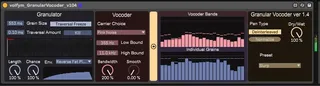
The Granular Vocoder operates by splitting the incoming audio signal into 24 simultaneous grains, and then feeding each of these grains to independent vocoder bands.
This can generate interesting artefacts and noisey stuff that may be useful for sound design purposes.
This is my first M4L device and was completed for a module during my university study.
Usage notes:
I recommend using a full-frequency signal like a finished song at first and trying different presets to get a sense of how it works.
Due to the way I handled normalization, the volume may drop off over time and require re-normalization by pressing the normalize button. This does cause a sudden volume change however.
Parameters are marked with Infoview comments.
Can be quite cpu-intensive.
Enjoy :)
Comments (2)