a better search for max devices
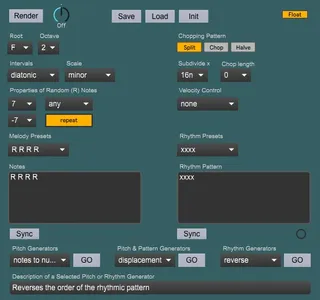
Melody Spawner screenshot

Melody Spawner

by zaion

Melody Spawner is a Max for Live midi device for generation ...

View on maxforlive.com

Type
MIDI Effect
Author
zaion
Version
1.2
License
None
Live version
10.1.18
Max version
8.1.5
Downloads
1,063
Updated
2025-07-30

Description

Melody Spawner is a Max for Live midi device for generation and development of monophonic melodies. Get inspired or create a melody outright directly inside Ableton Live's clips.

For detailed information about the device, visit https://www.nohasslebeats.com/melodyspawner

Comments (11)

  • robschoen · April 25 2022
    I was really interested to try this, but I can't get it to work. No notes are ever rendered. Has it been tested with Live 11?
  • robschoen · April 25 2022
    Do I need to install Scribbletune for it to work?
  • zaion · April 25 2022
    1.1 - fixed the issue with the rendering. The device should now be producing melodies as intended.
    @robschoen thanks a lot for letting me know! Please download the newly uploaded version.
  • zaion · April 26 2022
    1.2 - device type updated from "None" to "MIDI". This means that the device can now only be mounted on a midi track before an instrument.
  • justix66 · April 30 2022
    Unfortunately is not working on my Live 11 neither on my 10 version, placed in a midi channel front a VST but is not rendering no matter what I click?
  • zaion · April 30 2022
    @justix66, Im sorry about the difficulties. Have you downloaded the latest version? If so, then I'm curious to know how are you trying to render a melody, as the plugin should be working properly by now
  • justix66 · April 30 2022
    I downloaded what is available here so should it be the latest? I put your max patch in a midi channel followed by a vst or Live instrument in the same channel and click on render after few adjustment but nothing.. that is also for the Chord one..so I must doing something wrong
  • justix66 · April 30 2022
    Actually I know create a clip ( I thought it would make the clip on his own and notes are created BUt need to understand how to short the clip as it goes really looong
  • zaion · May 01 2022
    @justix66, unfortunately, the device has a bit of a learning curve. You can find a bit of a guide on how to work with it at https://janzaion.pro/projects/Melody-Spawner . Posting just in case you are not aware of it by now.
    If you want to make notes shorter, edit the 'Subdivide x' parameter. The parameter controls the length each 'x' represents.
    And thank you for sharing your experience, this is an invaluable feedback for me. In the future, I will probably make a short video tutorial, hopefully it will clear some confusion as to how to use this device.
  • 3B1 · May 03 2024
    Thank you so much this is extremely useful 🙏🏾🙏🏾
  • 3B1 · May 03 2024
    Emoji’s turned into question marks. Thanks again!!

← Back to search