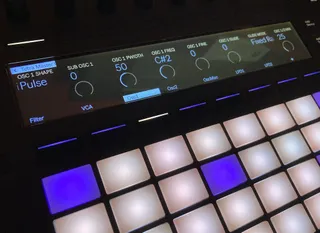
Tetra Master Controller - with Push support
This is a COPY of the Tetra Master Controller 1.01 (see http...
- Type
- MIDI Effect
- Author
- pea
- Version
- 1.02
- License
- None
- Live version
- 11.1.1
- Max version
- 8.1.5
- Downloads
- 255
- Updated
- 2022-05-17
Tetra Master Controller - with Push support is a MIDI Effect for Ableton Live by pea, distributed as freeware, with no license specified by the author. It targets Live 11.1.1 and Max 8.1.5. On maxforlive.com it has 255 downloads. Published 2022-05-17. 7 user comments below.
New to Max for Live? Read what MIDI Effects do, how device licenses work, how to install a device.
Description
This is a COPY of the Tetra Master Controller 1.01 (see https://maxforlive.com/library/device.php?id=1360) that adds Ableton Push (and Push 2) support. Edit your DSI Tetra directly from Push. So good...
The original author is @atari5200. I've merely added banks of controls for Push.
Comments (7)
Also it’s super nice to control this little synth from the push! Thanks
Great to hear that it works with the Mopho!
Also how hard would it be to have the max device load patches from the hardware? It would be extremely cool if it could revive and send patches so the knobs would reflect the state of the synth.
@n0ael Agree, this would be super duper cool and I would love this, too.
Sadly I think that the only way to do this is to parse the SysEx information that is sent from the synth when it changes patches. This SysEx is entirely different kind of data to the NRPN/CC data that this Max device sends to the synth.
Therefore... not straightforward I'm afraid.
https://ctrlr.org/tag/mopho/