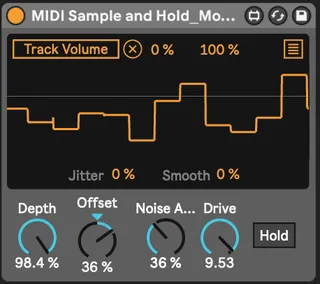
Modified MIDI Sample and Hold
Original device by denisdesantis: https://maxforlive.com/...
- Type
- MIDI Effect
- Author
- Yogen
- Version
- 1.0
- License
- None
- Live version
- 11.1.5
- Max version
- 8.1.5
- Downloads
- 836
- Updated
- 2022-06-06
Modified MIDI Sample and Hold is a MIDI Effect for Ableton Live by Yogen, distributed as freeware, with no license specified by the author. It targets Live 11.1.5 and Max 8.1.5. On maxforlive.com it has 836 downloads. Published 2022-06-06. 9 user comments below.
New to Max for Live? Read what MIDI Effects do, how device licenses work, how to install a device.
Description
Original device by denisdesantis:
https://maxforlive.com/library/device.php?id=6936#19512
Modified by Yogen to allow the user to influence de output value using the input MIDI note.
-the "Noise Amount" knob lets you set how random you want the output to be.
-the "Drive" knob lets you multiply the output value. This results in an exaggerated movement, which can be useful when using a narrow range of input MIDI notes.
Comments (9)
I'm very new to Max so I don't know what's going on... :(
I tried downloading the device from this very page and it works just fine for me :/
Sorry about the late answer as well, I wasn't really expecting anyone to comment ahahah ^^'
Let me knoe if you found what was causing the issue!
Thank you!
I'm not sure to understand:
You would like, to send a trigger to the S&H in a loop?
So it generates a random note every half, 1 or 2 bars?
If so, you can simply use a Lfo to do that!
If you want the Lfo to only start taking effect when you press a certain note, you can automate the bypass through clip automation
Did I miss anything?
I hope now make more sense, thank you
Ps: i dont care if is looping the previous bars or the next one after pressing the button, how is easiest for you to implement (if is the same for you then previous one make more sense)