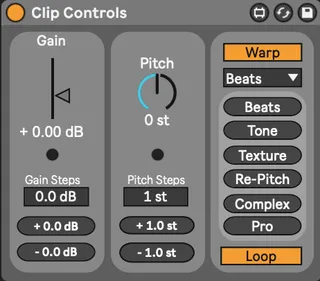
Clip Controls
Take control over the selected clip's main parameters throu...
- Type
- Audio Effect
- Author
- Yogen
- Version
- 1.4.1
- License
- None
- Live version
- 11.3.3
- Max version
- 8.5.4
- Downloads
- 0
- Updated
- 2023-07-05
Clip Controls is an Audio Effect for Ableton Live by Yogen, distributed as freeware, with no license specified by the author. It targets Live 11.3.3 and Max 8.5.4. First published 2022-08-10, last updated 2023-07-05. 18 user comments below.
New to Max for Live? Read what Audio Effects do, how device licenses work, how to install a device.
Description
Take control over the selected clip's main parameters through mappable buttons and UI elements!
You can therefore map these controls to any [key] or [midi], directly from Ableton Live.
To use the device, just add the Max for Live - Audio Effect "Clip Controls" to any Audio Track (like your Master Track for example). Then map your [key] or [midi] controls and start using them on any selected audio clip.
Thank you for trying out my device :D
Yogen
v1.4.1
-Device now fully functional and stable
-Now also works in Session View
Comments (18)
I'm trying it and notice a couple things:
(1) The center Pitch wheel text is hard to read with some Live themes, including 3rd-party ones. But try the built-in Dark theme and have a look? Maybe if this used the current theme's colors instead of its own color values it'd contrast more highly and fit in better?
(2) I can't seem to record and playback automation successfully. If I record automation, then it triggers the "Re-Enable Automation" button. If I click it to go away, then it just gets enabled when I play the clip with the automation again. Any way to deal with this?
I'll take a look at it thank you for the feedback, I didn't do much testing before publishing it so any report like yours is more than welcome. :)
I haven't really played around with color themes too much I must admit, I'll look it up and try to come up with a solution!
I love UI design and it breaks my heart to hear that some users may have a hard time reading it :o
I'll be sure to get back to you when all of that is fixed
Cheers
It seems very tricky at first glance to get the arrangement automation working, but I'll have a real shot at it don't worry.
Cheers
Yogen
It was developed on an M1 Mac so I'm confident there is no correlation there l.
When you have a moment, can you send me an email with a couple screenshot by any chance?
It only works in arrangement view for now :)
I'll work towards making it session view compatible at some point.
Cheers
Arrangement clips and Session Clips are two different things in M4L.
To make it work in session view, I will have to create the exact patch I use to detect "which Arrangement Clip is currently selected" but for Session Clip instead, and add some detection of what view you are using right now to choose between the two or something like that.
Nothing super complicated but I didn't take the time to do it beforehand :)
And I almost never use the session view, to be honest. Except for producing live sessions or drafting ideas real quick using loops ^^'
But of course, I wanna make them useful for as many people as possible so this will definitely be a nice addition!
Cheers
Yogen
Hi!
I don't think this is doable at all, unfortunately.
I've been looking around for documentation but I'm not optimistic I can pull that off... sorry :/