- Type
- Instrument
- Author
- Zcpvtr
- Version
- 1.0
- License
- None
- Live version
- 11.0.12
- Max version
- 8.3.1.
- Downloads
- 698
- Updated
- 2022-06-13
Triptyque is an Instrument for Ableton Live by Zcpvtr, distributed as freeware, with no license specified by the author. It targets Live 11.0.12 and Max 8.3.1.. On maxforlive.com it has 698 downloads. First published 2022-06-10, last updated 2022-06-13. 8 user comments below.
New to Max for Live? Read what Instruments do, how device licenses work, how to install a device.
Description
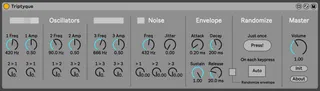
Triptyque is a Max for Live synthesiser aimed at creating special effects.
At its core lie 3 sinusoidal oscillators, a frequency modulation matrix and a randomization system.
It produces sounds somewhere between weird textures, like found in the electronic music from the 50s, and harsh noise mayhem.
This kind of patch is generally tedious to create using traditional synthesizers, or straight not possible (due to the fixed nature of the signal path), so I thought it would be cool to have it handy in a quick solution, as well as a good opportunity to learn more about Max/MSP.
More info and sound examples can be found here:
https://victormorello.com/triptyque.html
_____________________
#How to operate:#
-Insert Triptyque on an instrument track
-Send any MIDI note (the MIDI pitch is ignored, but MIDI note on messages are used to trigger the envelope)
-Try out the randomisation features and feel like a mad scientist
I suggest to use another audio track to record the output in real time so that you can play around with resampled results!
Comments (8)
Can you also try to set the Oscillator Amp and Master Volume manually to 1 and see if that changes anything ?
Can you try downloading it directly from my site?
https://victormorello.com/downloads.html
I've tried opening it in Live 11.1.1 and 11.0.12 and they both worked
Thank you for the feedback! Added info in the description :)
Really nice device.
Just thought I'd mention that I'm testing Live 11.2 beta at the moment, and there I find that with "auto" enabled, while the sounds do change, the various dials are not visually updated with each note.
https://www.youtube.com/watch?v=J8S_I3fwvr0
:)))
Could not figure out a way to have them update and not be added to the Live Undo history, no matter how hard I tried with the various automation settings :)