- Type
- MIDI Effect
- Author
- DougHirlinger
- Version
- 1.0
- License
- Commercial
- Live version
- 11.0.12
- Max version
- 8.3.1
- Downloads
- 1
- Updated
- No Updates
MIDI Gliss is a MIDI Effect for Ableton Live by DougHirlinger, distributed as a commercial (paid) device. It targets Live 11.0.12 and Max 8.3.1. On maxforlive.com it has 1 downloads. Published 2022-06-15.
New to Max for Live? Read what MIDI Effects do, what the Commercial license means, how to install a device.
Description
The MIDI Brains behind Gliss Bliss...
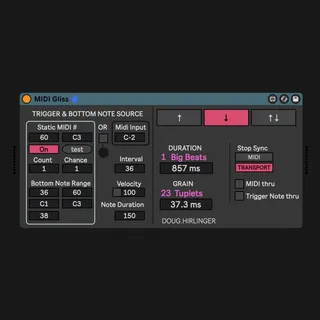
Create ascending and/or descending MIDI runs or arpeggios defined by interval, duration, and grain fed to an instrument in Ableton. Set a bottom note or range of possible bottom notes and an interval to a note above. Set a MIDI note to trigger the gliss from inside (i.e. MIDI clip) or outside Ableton (i.e. drum trigger or keyboard). Next set a duration of time from the start at the bottom note to the arrival at the top. Then set the grain. Grain determines how often a new pitch is played during the duration of the gliss. Duration can be determined by beats or milliseconds. Grain can be determined by rhythmic subdivisions which we're calling tuplets, or in milliseconds. Tuplets are evenly spaced notes or rests inside a bigger beat or pulse. Instead of predetermined, triggered bottoms notes, incoming MIDI notes can also determine the bottom of the gliss and trigger the gliss. Glisses can go up, down, or alternate between up and down.