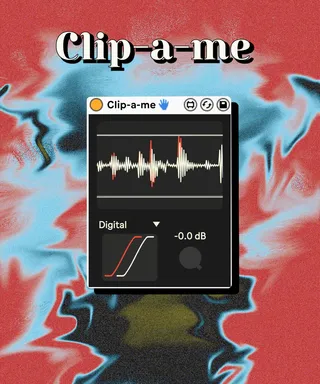
Clip-a-me
Clip-a-me is a free max4live designed and built by Aval. ...
- Type
- Audio Effect
- Author
- WalrusFlower
- Version
- 1.0
- License
- None
- Live version
- 11.0.12
- Max version
- 8.1.5
- Downloads
- 0
- Updated
- 2022-07-10
Clip-a-me is an Audio Effect for Ableton Live by WalrusFlower, distributed as freeware, with no license specified by the author. It targets Live 11.0.12 and Max 8.1.5. Published 2022-07-10. 3 user comments below.
New to Max for Live? Read what Audio Effects do, how device licenses work, how to install a device.
Description
Clip-a-me is a free max4live designed and built by Aval.
----------------------------------------------------
It's a Soft Clip device with various clipping function to choose from.
It's ready to use, just choose a function and turn the "THS" dial down to start clipping your sound. Try to experiment with different function and listen how it will change the distortion from one to another: you’ll see your audio stream in the scope and the threshold clipping it; the two shapes bottom left are standard clipping (white) and soft clipping function in use (red).
IMPORTANT: The scope only works with Ableton 11
THS: Clipping threshold
Function box: Various type of clipping function
Digital: digital clipping with no soft clipping function
Tanh: hyperbolic tangent, adds a tube-like saturation
Sinusoid: sinusoidal clipping curve, adds a subtle saturation
Exponential: Exponential function based clipping function, creamy and clean
Cubic1: type 1 cubic clipping curve, very clean
Quadratic: quadratic clipping curve, even cleaner
Cubic2: type 2 cubic clipping curve, alternative to type 1
----------------------------------------------------
No video demo as it's free, just download and try it :)
Comments (3)