a better search for max devices
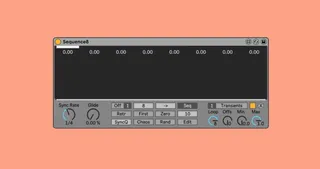
Sequence screenshot

Sequence

by incandescent

Sequence8 is a 32 steps parameter sequencer that can control...

View on maxforlive.com Website

Type
Audio Effect
Author
incandescent
Version
81.01
License
Commercial
Live version
10.1.18
Max version
8.1.5
Downloads
0
Updated
2022-08-09

Description

Sequence8 is a 32 steps parameter sequencer that can control 8 parameters in Live. Being quite simple to use, this device nevertheless offers a variety of advanced sequencing options (e.g. modulating itself)

Features:

-Every step value can be automated or mapped by a midi controller or a m4l device (including the sequencer itsel)

-Every parameter has its own Loop duration and Offset which can be automated/modulated

-A glide that (if set > 0%) begins before the target step and ends at the target value right on the clock.

-A grid to which all the values will be quantized (even when they are modulated)

-2 views for the display: a Sequence View to edit the sequence, and a Steps View to display and set every parameters current step individually

-And much more...

You can download the reference from the link below for a complete overview of the device.

A lot of work went into this device. Be creative with it...

Changelog:

-V1.01: Bug fixes...

Comments (24)

  • AYA · July 25 2022
    truly an amazing device, you've knocked it out of the park with this one. Anyone hesitant to buy, go for it! Sequencing automation is bringing so much life (all in time too) to my synths!
  • connorpogue · July 25 2022
    can this be used with the DevicePreseter m4L device? (it comes with M4L building tools pack)
  • incandescent · July 25 2022
    @connorpogue Yes it works perfectly with the Max Api DevicePreseter
  • incandescent · July 25 2022
    @AYA Thank you so much for appreciating my work!!
  • mi666 · August 01 2022
    just bought it, doesnt work, mapped it to a parameter but its not moving
  • incandescent · August 01 2022
    @mi666 hi there! The sequence8 doesn't change parameters values "on it's own" like an LFO would, but rather with a sequence put by the user; and the sequencer must be running (either with play/pause or with the On/Off toggle) for it to go through the sequence.
    Try pressing the Rand button (after mapping a parameter), and then play in Ableton.
    If this doesn't help you, please tell me how exactly the device is not behaving as expected.
    All the best
  • mi666 · August 02 2022
    mapped it to a parameter, sequencer is playing, added random values by hitting the random button but the parameter is still at 0 with no movement. also tried it with multiple parameters, they're all at 0 - not moving at all. im using live 10 btw could that be the issue?
  • incandescent · August 09 2022
    Alright it shouldnt be a problem anymore in V1.01
  • ckl · August 23 2022
    Please add Paypal..just can't download it otherwise
  • RRR · September 04 2022
    Same! Please add Paypal
  • RRR · September 04 2022
    I also wonder if this device has any Push mapping by default?
  • Tape9 · September 13 2022
    Hi, i would like to buy the Sequence8 Device but only accepts credit card trough GumRoad, can i direct PayPal you maybe?
  • Gohan2A · October 21 2022
    Hi, i would like to edit the sequencer (i just want random 0 - 1, no interval). Why it's not possible?
  • Gohan2A · October 21 2022
    i have found an other solution. Great device man
  • memestreak · December 25 2022
    Request:
    Allow the steps to increment by [discrete?] midi note input rather than clock division during playback. My goal is to use this to achieve a round-robin configuration using an arpeggiator.
  • elrondubbard · January 07 2023
    The potential of this device was not initially apparent to me-
    Just blown away by this device 🙌🙌
  • tweaksource · January 19 2023
    Like many others I would purchase the device if I could do so with the otherwise ubiquitous Paypal.
  • incandescent · January 20 2023
    Alright folks I have now added PayPal.
    I hope you like the device, please email me if there's any issue with it.
    Best
  • incandescent · January 20 2023
    @elrondubbard Thank you for appreciating my work! I also think that it is a very powerful sequencer; Please feel free to send me anything creative you make with, I'm genuinely interested in how people would use it.
  • incandescent · January 20 2023
    @memestreak I like the idea! That's definitely a feature I'll add on the next update. For now you can try automating the parameters loop Offset or maybe mapping it to a midi controller or a m4l device...
  • Kartoushh · February 12 2023
    I Incandescent,
    I just bought your device, it looks cool but i can't figure out how to the following thing (please forgive the following english...)
    Here's what I'm tring to do .
    Let's say the sync rate is 1/8TH.
    I would like that if i click on the third 8th note (for instance) of my arrangement , sequence8 simply jumps to step 3.
    How could I achieve that?
    thanks 🙏
  • incandescent · March 01 2023
    Hi @Kartoushh
    The Sequence8 just wont do that sorry :/ You can still jump to step 3 by clicking the 3rd step value, its behaviour when doing so is well documented in the Device Reference (downloadable from the gumroad main page)
    I hope this helps,
    Best
  • Kartoushh · March 09 2023
    Ok thanks for answering
  • RRR · November 28 2023
    Could you make the Step selector mapable? I can click-drag it with the mouse, and would like to automate this with a random LFO. Additionally, just having 'random' as a sequencer mode would be great too.

← Back to search