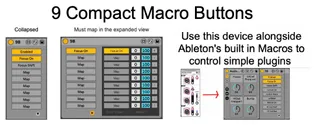
9 On-Off Buttons
These are 9 assignable buttons that can turn things on and o...
- Type
- Audio Effect
- Author
- revertless
- Version
- 1.0
- License
- None
- Live version
- 10.1.18
- Max version
- 8.1.5
- Downloads
- 753
- Updated
- 2022-08-08
9 On-Off Buttons is an Audio Effect for Ableton Live by revertless, distributed as freeware, with no license specified by the author. It targets Live 10.1.18 and Max 8.1.5. On maxforlive.com it has 753 downloads. Published 2022-08-08. 1 user comment below.
New to Max for Live? Read what Audio Effects do, how device licenses work, how to install a device.
Description
These are 9 assignable buttons that can turn things on and off.
The buttons can be mapped to a bunch of stuff but I figured I'd give instructions to other beginners like me for assigning it to plugins.
Instructions:
1. Create an Audio Effect Rack and put the device and your plugin inside
2. Click the button labeled Map in the device's expanded view
3. Click on a parameter you'd like to control in your Plugins configure view.
4. Use abletons built in macros to control parameters that aren't buttons.
4. Save the rack to re-use. (You can't copy and paste this device, I'm not sure why)
As stated before this is based off the One Button device created by surferpikachu.
https://maxforlive.com/profile/user/surfingpikachu
I tried to improve upon the user interface of the previous device I posted by making it as small as possible. Im leaving the old ones up incase this version is buggy.
Im a total novice at M4L so please feel free to improve upon this device and point out bugs. (Im using the trial version of M4L and don't plan on maintaining this device once it expires)
Thanks!
Comments (1)
But if I may comment, it could be even greater with the following changes :
- a bit bigger font (it's very very tiny)
-a way to rename each slot : right now, if you assign each slot to a plugin in your rack, it says only "Device on", so it's not easy to remember which device is associated with which slot.