noteEnveloper
This devices provides 3 seperate ADSR envelopes on a midi tr...
- Type
- MIDI Effect
- Author
- b3nny
- Version
- 1.0
- License
- None
- Live version
- 8.2.7
- Max version
- 5.1.9
- Downloads
- 695
- Updated
- 2012-03-12
noteEnveloper is a MIDI Effect for Ableton Live by b3nny, distributed as freeware, with no license specified by the author. It targets Live 8.2.7 and Max 5.1.9. On maxforlive.com it has 695 downloads. First published 2011-08-03, last updated 2012-03-12. 10 user comments below.
New to Max for Live? Read what MIDI Effects do, how device licenses work, how to install a device.
Description
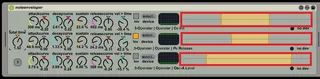
This devices provides 3 seperate ADSR envelopes on a midi track.
These 3 envelopes can each control any device parameter in your live set.
attack is triggered by note-on
release is triggered by note-off
(might add a legato-mode)
parameter range is set by using the range sliders highlighted in red on the screenshot.
i think its self explanatory, but i could be wrong :)
all comments welcome
(3rd of January, 2012: device has been updated, due to reports of inconsistent behaviour)
Comments (10)
im using ableton live 8.2.2 ... with max 5.1.0
what happens when you try to drag the device to a midi track?
Im using windows by the way ..
Have you tried upgrading to the most recent version of max5 ?
It was developed on 5.1.8, and I have no way to test with earlier versions here.
Maybe you could take a screendump / copy the text from the max message window, to help locate the problem.
Running Live 8.2.5 and Max 5.1.9
Here is a screen shot of it in action, and doing nothing.
http://imageshack.us/photo/my-images/853/45630188.png/
Try clicking those in your set, hope it helps.
Thanks for you help. This is exactly what I needed.
It would be nice if we had a map button like the standard m4l devices have. 3 drop downs is a bit tedious.
Still great device, thanks!
Currently if you have glide setup in your synth, when you press the next key to glide to, the envelope starts over, then drops to zero as soon as the first note is released.
A button to turn glide on/off for each envelope would be great.
Thanks again for your hard work!