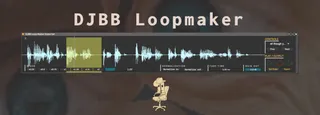
DJBB Loopmaker - Quickly find and Export loops
A Free Max for Live utility to help with de-clicking, loopin...
- Type
- Instrument
- Author
- djbajablast
- Version
- 1.0
- License
- AttributionNonCommercial
- Live version
- 10.1.18
- Max version
- 8.1.5
- Downloads
- 0
- Updated
- 2022-11-14
DJBB Loopmaker - Quickly find and Export loops is an Instrument for Ableton Live by djbajablast, distributed as Creative Commons Attribution-NonCommercial. It targets Live 10.1.18 and Max 8.1.5. Published 2022-11-14. 3 user comments below.
New to Max for Live? Read what Instruments do, what the AttributionNonCommercial license means, how to install a device.
Description
A Free Max for Live utility to help with de-clicking, looping, and one-click exporting to an output folder.
Demo here: https://www.youtube.com/watch?v=JV3YPtjxv50
_______________________________________
-- WHY --
In Ableton, I couldn't find a non-annoying way to... chop a perfect loop, apply small fades to de-click, optionally adjust playback speed, and then one-click export to an output folder. There were always resampling steps, and my filenames would get lost in the process, which means a lot of -retyping (I store BPM / Key info in the names).
-- NEW WORKFLOW --
With this device, my workflow looks like this:
1. Drag in folder of samples to process.
2. Set output folder.
3. Find fun loops in samples, clicking the record button to capture.
4. Click "Export" whenever you hear something fun in the output buffer.
5. Check out your output folder to find your new perfectly looped goodies.
-- FEATURES --
- Variable speed playback - easily slow down / speed up looped selection
- One click loop export. No file overwriting (so click away).
- Fade time can be applied to reduce clicking
- Keyboard shortcuts to navigate (click (?) icon in top left of device)
- Ability to normalize input and output samples.
-- LIMITATIONS --
- WAV files only for now
- Can't drag folders directly from Ableton - must be from finder / explorer
- ??? probably others.. lemme know
__________________________________________
Lots of free samples n' biz at https://djbajablast.com
Comments (3)