Muse Concrete Tool a Sampler Loop Sketchpad
v1.2 ~ added probability option to both incoming midi notes ...
- Type
- Instrument
- Author
- offthesky
- Version
- 1.2
- License
- None
- Live version
- 11.2
- Max version
- 8.1.5
- Downloads
- 1,094
- Updated
- 2023-05-17
Muse Concrete Tool a Sampler Loop Sketchpad is an Instrument for Ableton Live by offthesky, distributed as freeware, with no license specified by the author. It targets Live 11.2 and Max 8.1.5. On maxforlive.com it has 1,094 downloads. First published 2022-11-04, last updated 2023-05-17. 2 user comments below.
New to Max for Live? Read what Instruments do, how device licenses work, how to install a device.
Description
v1.2 ~ added probability option to both incoming midi notes as well as the auto note generator. added a 'midi note plays sample offset' feature(experimental). added a better reverb in the master fx section*. bunch of little fixes and improvements. this vid shows a demonstration of the new features: https://www.youtube.com/watch?v=Zn5LA1tbfhI
v1.1 ~ added generic step sequencer, added mstr output fx (freeverb>limiter), added mstr audio out to lane recording, added ability to send lanes' audio to separate tracks in ableton (full stereo=1/2, laneA=3/4, laneB=5,6 etc), fixed window close/open bug
v1.0 ~
i needed a tool that would help me quickly sketch with and build basic experimental or ambient songs out of all these vinyl, tape, radio, and field recording samples i've captured over the years. and also allow me to make rhythms and or crazy textures if needed. through the process of making and exploring with this tool, i realized it can do a whole lot more. and is even useful for live performances. especially when you play midi notes into it. it can then be useful for just about any genre. you can build pads, make beats, etc. i didn't initially think to share it but a friend mentioned other's might find it useful too... hope it provides the community some inspirations!
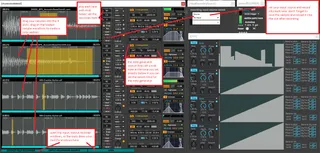
basic use instructions (see the screenshot image): you can drag+drop or even record audio into each of the 4 samplers. then click+drag on a samples' waveform to make a loop section. you can play midi notes (polyphony) into this or let the auto note generators (turned on by default so you can immediately hear the samples) make off grid sequences for you. if you record into the lanes - DONT FORGET TO SAVE THEN DRAG THE FILE FROM THE BROWSER BACK INTO THE LANE so that when you reload the ableton project, everything will be as you left it.
here's a demo video showing most of the basic functions. in the description there you can also download some demo projects i threw together while making the video that use this tool so you can observe some different ways to make use of it:
https://www.youtube.com/watch?v=U78exwFJp1I
let me know of any bugs you run across, im sure there are plenty. also the keyboard zone filter section is a bit odd.. the bottom note always starts at c3(you can further offset that with the root shift numbox). i might change it to behave like a more traditional keyboard zone/note filtering system. also want to add multiple outputs so you can route each lane into a separate track for further process in live. and of course some kinds of internal sequencers.
shout out to the following devs of these amazing m4l patches that i utilized to make the muse concrete tool tick:
more simpler frz 2.0 by maxforlive.com user frz::
https://maxforlive.com/library/device/7344/more-simpler-frz-v2
lfodraw 1.0 by maxforlive.com user delicateear::
https://maxforlive.com/library/device/3331/lfodraw
quick record 1.0 by maxforlive.com user natecraypo
https://maxforlive.com/library/device/6163/quick-recorder
floating window code by cycling 74 max msp forum user PID
https://cycling74.com/forums/floating-window-2?replyPage=1
lovely reverb in master fx section by remo de vico:
https://www.remodevicocomposer.eu/
also the core paradigm of this tool was inspired by the quad chaos m4l instrument by pheek and Armando Gonzalez Sosto (although no code or subpatches from quad chaos were used):
https://audioservices.studio/product/quad-chaos
there's also a standalone app of this:
win - https://tinyurl.com/5n922wxh
osx - https://tinyurl.com/2n4tsam4
https://www.youtube.com/watch?v=TxfNaICei18 - a video showing the windows standalone
https://www.youtube.com/watch?v=dcX6PYo1KQ4 - video taking the OSX standalone for a spin
Comments (2)