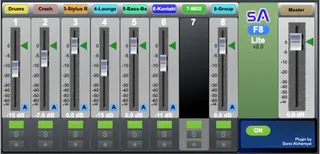
SA-F8 Lite 8 Track Floating Fader Mixer
The SA-F8 Lite floating 8 track fader mixer is a free versio...
- Type
- Audio Effect
- Author
- SonicAlchemyst
- Version
- 2.0
- License
- None
- Live version
- 9
- Max version
- 7
- Downloads
- 143
- Updated
- 2022-12-30
SA-F8 Lite 8 Track Floating Fader Mixer is an Audio Effect for Ableton Live by SonicAlchemyst, distributed as freeware, with no license specified by the author. It targets Live 9 and Max 7. On maxforlive.com it has 143 downloads. First published 2022-12-28, last updated 2022-12-30. 4 user comments below.
New to Max for Live? Read what Audio Effects do, how device licenses work, how to install a device.
Description
The SA-F8 Lite floating 8 track fader mixer is a free version of the SA-F Pro Series floating fader plugins.
Check out the SA-F8 Lite and if you like it, take a look at the SA-F Pro series:
https://sonicalchemyst.gumroad.com/l/SA-F
The download includes the SA-F8 Lite.amxd, the SA-F User Guide, and the SA-F Series Feature Guide.
Upgrade to the SA-F Pro starting at only $6, get all these amazing features, and support me in making more plugins (including free ones). :)
~ Extra Features in the SA-F Pro ~
- 8, 16, 24, 32, and 48 Tracks
- Custom Track Selection
- Track selection Reset
- 4 Aux Sends
- Automation Indicators
- Automation Reset Buttons
- Fader Zero Reset
- Fader: - ∞ db Reset
- Project Track Selector
- Project Track color
- Plugin Window Scaling
- Ableton Transport
Enjoy the plugin,
Sonic Alchemyst
Comments (4)
-make possible to arrange monitored tracks in the M4ldevice in a custom way . For example with 10 audios tracks , ordering tracks in another order track 4,1,2,5,6,3,8,7 without modifying the current live set track position
.Selecting tracks in a custom order some of the currently avaible tracks in the live session , not necessary all . I thought it was possible when i read "Track select via name or track number" . But it seems not possible with the lite version ? Such a functionnality is part of the "SA-M Floating Mixer Series 2.0"
-being able to make groups of such order that can be named . For exemple the "vocal work", "bass work" , etc ... and recall them with one click
-Midi mappable : Is the Solo reset initialisation is the onlymidi mappable element ? it would be really interesting to be able to map rec, arm,faders, solo etc ...
-Having the mappable always stick in the currently track order : for example we map the first fader and it is currently controling a bass track . We can control with an external controller the fader of it . If we change the group track and the Fader 1 become a vox track then we still be able ton control this fader with the same external control .
Thank you for checking out the SA-F8 Lite. :)
To respond to the feature requests above:
Customization of the track selection is available in the SA-F Pro Series which comes in 8, 16, 24, 32 and 48 track version.
You can select any tracks in any order you like. :)
"Track select via name or track number" this function is available in the SA-F Pro Versions.
Check out the SA-F Feature guide in the download for all of the feature differences or head over to this page:
https://sonicalchemyst.gumroad.com/l/SA-F
"-being able to make groups of such order that can be named . For exemple the "vocal work", "bass work" , etc ... and recall them with one click"
I am going to be adding a Preset function in future releases. :)
"- Midi mappable"
I did not add this feature, as the functions can all be mapped directly in the Ableton project. I shall add this to the list of functionalities to add to the SA-F Pro series
"-Having the mappable always stick in the currently track order "
Another great feature enhancement, which I can build into future releases of the SA-F Pro Series.
Thank you Zengel.
Sonic Alchemyst
Thanks for answering !
Have a good day !