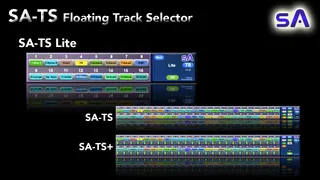
SA-TS16 Lite 16 Track Floating Track Selector
Getting to tracks in your project has never been easier!!!!...
- Type
- Audio Effect
- Author
- SonicAlchemyst
- Version
- 1.0
- License
- None
- Live version
- 9
- Max version
- 7
- Downloads
- 233
- Updated
- 2023-03-12
SA-TS16 Lite 16 Track Floating Track Selector is an Audio Effect for Ableton Live by SonicAlchemyst, distributed as freeware, with no license specified by the author. It targets Live 9 and Max 7. On maxforlive.com it has 233 downloads. First published 2023-01-12, last updated 2023-03-12. 5 user comments below.
New to Max for Live? Read what Audio Effects do, how device licenses work, how to install a device.
Description
Getting to tracks in your project has never been easier!!!!
Is scrolling across the Session View in your project with lots of tracks taking up more time than you would like?
Introducing the SA-TS16 Lite
Well, drop the SA-TS Lite on an audio track, open up the floating SA-TS Lite and the track your’ll looking for is just a click.
The TS16 Lite in a smaller FREE version of the TS48 and TS48 Plus 48 track floating track selectors. The TS and TS Plus have loads more features to enable easy access to all your tracks, even on very large projects.
The download includes the TS16 Lite.amxd file and the SA-TS user guide, so that you can see all the cool features available in the TS48 and TS48 Plus.
** Extra Features of the TS and TS Plus **
Link to the TS48 and TS48 Plus:
https://sonicalchemyst.gumroad.com/l/SA-TS
~ Custom Track Selection ~
Custom select the tracks in your project to put into the TS or Auto Fill the first 48 tracks.
~ Project Track Selector ~
The track you need to access in your project in only a click away (or 2 if you have more than 48 tracks in your project ! :)
~ Track Jumping ~
Jump up or down 48 tracks at a time to quickly access all the tracks in your project in just a couple of clicks. No more scrolling!!!!!
~ Track Colors ~
Follow the colors of the tracks in your Ableton project.
~ Window Scaling ~
Scale the floating window for 100% down to 50% for smaller screens.
~ Track Freeze ~
Allows for more accurate track following when adding or deleting tracks in your Ableton project.
~ Track Lock ~
Lock specific tracks into the TS so that they are always available.
~ Track Control Functions (TS Only) ~
The TS+ includes the following extra features:
- Track Activator
- Track Solo
- Track Arm
~ Configuration Save ~
The track selection that you make will be saved with your Ableton project.
Thank you for checking out the SA-TS Lite.
Happy creating!
Sonic Alchemyst
Comments (5)
Your Question:
Does it only select in session view?
Answer: No. It works in both the session view and arrengement view
The SA-TS series select the tracks in the project, which is completely independent of the session and track view.
The SA-TS Lite automatically selects the first 16 tracks of the project, and floats over the top of either the session view or arrangement view, or both if you have the second window open. it doesn't matter.
The SA-TS and SA-TS+ have 48 tracks for custom selected tracks, autofill with the first 48 tracks from your project, and the "Jumper" function, which jumps up or down 48 tracks at a time.
I see what you mean. :)
The arrangement view never 'jumps'/scoll to the selected track in the session view. This is unfortunately an Ableton live issue. The track will be selected in the arrangement view, but it will not scroll to it.
This is why I always use the session view to access the plugins in my tracks.
That being said following you pointing this out, it inspires me to find a way to auto-switch to the session view for single window view setups, so that it would switch to the session view, with another button to switch back to the arrangement view... :) I shall see what I can do. :)
I'll add this to the upgarde list.