Ableton DJ Booth
A Max for Live plugin that makes DJing with Ableton a pleasu...
- Type
- MIDI Effect
- Author
- MrWinter
- Version
- 1.0
- License
- None
- Live version
- 10.1.18
- Max version
- 8.1.5
- Downloads
- 0
- Updated
- 2023-03-08
Ableton DJ Booth is a MIDI Effect for Ableton Live by MrWinter, distributed as freeware, with no license specified by the author. It targets Live 10.1.18 and Max 8.1.5. Published 2023-03-08. 4 user comments below.
New to Max for Live? Read what MIDI Effects do, how device licenses work, how to install a device.
Description
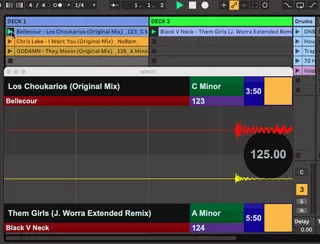
A Max for Live plugin that makes DJing with Ableton a pleasure 🎹
This Max4Live device can:
Display meta such as: Trackname, Artistname, Key, BPM.
Display the current waveforms using a spectrum (For visual beatmatching)
Display if the current clip has an active loop on
Display the remaining time that a track has left
Check my Github to download the device:
https://github.com/Adrian-Winter/Ableton-Dj-Booth
Comments (4)
das amxd Device lässt sich bei meinen Setup
nicht auf die Audiotracks ziehen.
Die Audiofiles (mp3) haben das angegebene Namens- und Dateiformat.
< artistname - trackname_BPM_key.mp3 >
(Winn11, Ableton 11.3.25 Suite)
Spielt es eine Rolle ob Live in der Sassion- oder Arrangement View ist,
ob Warp aktiv ist oder nicht?
Danke für dieses Tool und Deinen Support.
VG