- Type
- MIDI Effect
- Author
- ntrm
- Version
- 0.5.3
- License
- None
- Live version
- 11.2.10
- Max version
- 8.5.3
- Downloads
- 2,286
- Updated
- 2026-03-11
Autonomia is a MIDI Effect for Ableton Live by ntrm, distributed as freeware, with no license specified by the author. It targets Live 11.2.10 and Max 8.5.3. On maxforlive.com it has 2,286 downloads. First published 2023-03-06, last updated 2026-03-11. 33 user comments below.
New to Max for Live? Read what MIDI Effects do, how device licenses work, how to install a device.
Description
Free Download Link: https://meyer-devices.com/products/autonomia
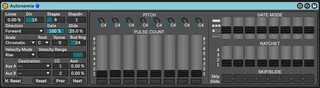
Autonomia is a clone of the Intellijel Metropolis with a few small enhancements and modifications.
Watch a video walkthrough of this device here: https://www.youtube.com/watch?v=WPj25yF32S
The sequencer includes all of the features of the Metropolis, including all the direction modes (including the "fixed" modes, skips, slides, step division, ratchets, and more. These are the ways in which Autonomia differs from Metropolis:
- Clock is based on Live's transport, BPM, and time signature
- Accepts and produces MIDI (obviously)
- Swing feature replaced with a "loose" feature that I think is more musically useful. Loose uses randomness to add a non-robotic feel to the sequence.
- Velocity feature that allows the feature to vary the amplitude of the receiving synth
- Aux modulation ports accept CCs, modulation destinations have been adapted from the Eurorack format to MIDI/M4L format
- Note transpose parameter (Sending a MIDI note to the device will transpose the sequence, independently of this parameter)
Notes:
- For Slide to work correctly, you must use a synth that accepts high resolution pitch bend and send the Bend Range parameter on Autonomia to match the synth's pitch bend range. For best results, use the highest value allowed by the synth.
Comments (33)
--Bug Fixes--
* Reverse direction mode offset by 1 step
* Ping Pong Fixed direction mode was the same as Forward Fixed
* Updated minimum Max version to 8.3
* Slide doesn't slide as expected
--Enhancements--
* Added Note Reset button to reset input MIDI note transposition
* Added support for Push with live.banks
* Velocity Range supports Live automation
*
*
fwiw it was simply a matter of replacing a loadbang with live.thisdevice!
also - i say this to almost everyone who creates one of these 185/metropolis sequencers - it is very helpful to have the total number of steps for the sequence length to be calculated and displayed on the panel - so you can easily create loops and not get confused why stuff is out of sync
funny, my friend has the M185 and I used it for the first time - those other gate modes are cool!
what i was thinking about maybe trying is having a little euclidean pattern generator that is tied to the repeat mode. so for when the gate mode is REPEAT, there is a second slider/dial that sets the event density to generate the euclidean pattern.
Thanks for the response. Most max devices work fine: https://help.ableton.com/hc/en-us/articles/8506527153308-Push-standalone-Max-for-Live-Device-Compatibility
The other sequencers I use all work, but on one of them the parameters are not available in live.banks for control. For your device, however, all of the parameters are showing up just fine, which gives me hope, it’s just the sequencer clock that’s not running. I hope I can figure out how to get yours running, as it would be my primary work horse on the P3S.
Another small point, looks to me like D is unavailable as a root note in the device - the dropdown skips straight from C# to D#