- Type
- Audio Effect
- Author
- beatskk
- Version
- 0.9
- License
- AttributionNonCommercialShareAlike
- Live version
- 8.2.5
- Max version
- 5.1.8
- Downloads
- 871
- Updated
- 2011-09-11
Clip tempo is an Audio Effect for Ableton Live by beatskk, distributed as Creative Commons Attribution-NonCommercial-ShareAlike. It targets Live 8.2.5 and Max 5.1.8. On maxforlive.com it has 871 downloads. First published 2011-09-10, last updated 2011-09-11. 1 user comment below.
New to Max for Live? Read what Audio Effects do, what the AttributionNonCommercialShareAlike license means, how to install a device.
Description
Based on "Live tempo automator" by Monty
http://www.maxforlive.com/library/device.php?id=386
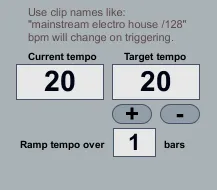
This one changes tempo based on clip names. End a clip name with "/128" to change to that bpm over a predefined number of bars.
or
set the target bpm using the +/- buttons. Tempo will instantly start to change over predefined number of bars.
You need to activate "select on launch" from live's preferences.
Be aware, that should you open up the patch, the tempo goes ape shit and if you press the +/- buttons from the max window... well, don't.
works great, but if you open it, don't expect it to work when you close it again.
Comments (1)