APC FX Sequencer by Mark Egloff
The FX Sequencer turns your APC into a Effects Sequencing Ma...
- Type
- Audio Effect
- Author
- marktakeshi
- Version
- 1.0
- License
- AttributionNonCommercialShareAlike
- Live version
- 8.2.3
- Max version
- 5.1.8
- Downloads
- 7,278
- Updated
- 2011-09-14
APC FX Sequencer by Mark Egloff is an Audio Effect for Ableton Live by marktakeshi, distributed as Creative Commons Attribution-NonCommercial-ShareAlike. It targets Live 8.2.3 and Max 5.1.8. On maxforlive.com it has 7,278 downloads. First published 2011-08-30, last updated 2011-09-14. 28 user comments below.
New to Max for Live? Read what Audio Effects do, what the AttributionNonCommercialShareAlike license means, how to install a device.
Description
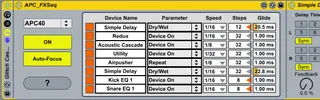
The FX Sequencer turns your APC into a Effects Sequencing Machine that lets you use up to 8 Audio-Effects to generate sound effect patterns that range from subtle variation to extremely glitchy sounds.
To use the APC FX-Sequencer, simply load the device onto an Audio track. The APC FX-Sequencer automatically configures your connected APC40 or APC20.
Then, add up to 8 Audio-Effects directly to the right side of the APC FX-Sequencer device. The APC FX-Sequencer automatically recognizes the added Audio-Effects.
Finally, add some audio-loop and launch it.
After connecting, the top four rows of the APC's button matrix toggle 32 steps of the currently selected Audio-Effect, while the clip stop buttons allow you to switch between the different Audio-Effects. Many of the APC's other controls are also reconfigured. The "?" button launches built-in documentation that details how everything works.
You can find a first Introduction-Video for the APC FX Sequencer AkaiProEU's Youtube-Channel: http://www.youtube.com/user/AkaiProEU
Special thanks to Akai Professional and Shane Hazleton for their support! Visit the official APC-website @ www.apc40.com
Also, check out the following APC devices:
- APC Step Sequencer: http://www.maxforlive.com/library/device.php?id=877
- Beat Indexer by Shane Hazleton Akai Professional: http://www.maxforlive.com/library/device.php?id=880
Comments (28)
Be great if the other step sequencer had 32 steps as well.
But if you are not the only one that asks for this feature, I will implement it in one of the next updates.
As a workaround for the moment, just wrap the single effect into an Effect Rack and assign the Makro to the parameter you want to control. Then you can set the Min and Max Values in the Macro-Settings.
http://www.youtube.com/watch?v=oFd3FXfBhGs
Thanks again!
I hope other users will also post some videos showing how they use the APC FX / Step Sequencer.
One small advice which is also mentioned in the manual: If you use Audio Effects that buffer audio like the 1st and 3rd effect in your video, choose to control the "Dry/Wet" parameter, instead of the default "Device On" parameter, because most effects don't buffer audio while they are turned off.
Also, Beat Repeat does work much better if you control the parameter "Repeat" (and set "Chance" to 0%), which will allow you to control exactly when and how long the Beat Repeat effect should kick in.
Looking forward to seeing more videos from you!
Which Max-Version do you have installed?
Cheers,
Mark
Nice devices! Thanks a lot!
The only thing that doesn't work correctly for me is the "stop all clips row" when i'm using one of your devices and hit "shift + any led button on that row" it stops the sound but the sequencer light still running.
I'm using Live 8.2.6 + Max 6
Any clue on how to fix that?
Cheers
Daniel
This is (almost) exactly what I was looking for. Is there a chance that this Sequencer will be cloned to LaunchPad?