- Type
- Audio Effect
- Author
- ernestoceccodortona
- License
- AttributionNonCommercialShareAlike
- Live version
- 9.1
- Max version
- 6
- Downloads
- 7,650
- Updated
- 2014-04-13
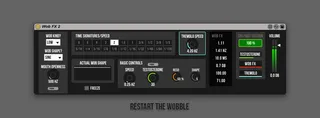
Wob FX2 is an Audio Effect for Ableton Live by ernestoceccodortona, distributed as Creative Commons Attribution-NonCommercial-ShareAlike. It targets Live 9.1 and Max 6. On maxforlive.com it has 7,650 downloads. First published 2011-11-21, last updated 2014-04-13. 16 user comments below.
New to Max for Live? Read what Audio Effects do, what the AttributionNonCommercialShareAlike license means, how to install a device.
Description
*************************************
IMPORTANT: DOWNLOAD AND INSTALL WOB FX FONT
http://www.dafont.com/bebas-neue.font
*************************************
"Looking for wobble? Look no further. The new Wob FX Max for Live device, developed by Ernesto Cecco D'Ortona, should take care of most if not all of your wobble needs."
The Ableton Blog
Installation:
Mac Install Path: /Users/You/Library/Application Support/Ableton/Library/Presets/Audio Effects/Max Audio Effect
Win Install Path: \Users\You\Documents\Ableton\Library\Presets\Audio Effects\Max Audio Effect
Hello World:
1. Open Ableton Live
2. Put an Analog on a midi track
3. Put Wob FX next to it
4. Play something with your keyboard
I recommend using Wob FX while recording everything you do in a Live's audio track.
Wob FX first video: http://www.youtube.com/watch?v=-q9s5b21sTw
------ ------ ------ ------ ------ ------
BE UP TO DATE ;) PLEASE VISIT:
www.facebook.com/wobfx
or email me: [email protected]
------ ------ ------ ------ ------ ------
Wob FX by Ernesto Cecco D'Ortona is licensed under a Creative Commons Attribuzione - Non commerciale - Non opere derivate 3.0 Unported License.
Permissions beyond the scope of this license may be available at [email protected].
Comments (16)
So, like the fb page if you want and i'll update ;)
http://www.facebook.com/wobfx
Thx a lot for your feedback and support :D
thanx a lot for great awesome device!!!
i got one problem:
when changing time signature on one instance of wob fx it is changed on other instances on other tracks too.
cheers,
thanx a lot again!!!!
Will be also available soon on http://vstbuzz.com with 70% discount, subscribe their newsletter :)
Will be also available soon on http://vstbuzz.com with 70% discount, subscribe their newsletter :)
Will be also available soon on http://vstbuzz.com with 70% discount, subscribe their newsletter :)
I want to automate, but the LFO starts at random times, so I don't know how to work with that.