- Type
- Audio Effect
- Author
- weswook
- Version
- 1.0
- License
- Commercial
- Live version
- 11.3.13
- Max version
- 8.5.5
- Downloads
- 0
- Updated
- 2024-01-20
SP950 Editor is an Audio Effect for Ableton Live by weswook, distributed as a commercial (paid) device. It targets Live 11.3.13 and Max 8.5.5. First published 2023-11-14, last updated 2024-01-20. 1 user comment below.
New to Max for Live? Read what Audio Effects do, what the Commercial license means, how to install a device.
Description
Product Title: SP950 Editor
Product Description:
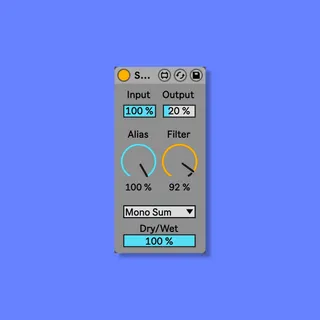
The SP950 Editor was developed to streamline your SP950 workflow in Ableton Live. This innovative tool reimagines the user interface, emphasizing minimalism and simplicity. Designed for use with Push 2 & 3, it comes pre-mapped and organized to knobs that follow the signal flow, ensuring an intuitive and efficient user experience.
Key Features:
Minimalist Interface:
Say goodbye to clutter and hello to a clean, minimalist design that puts simplicity at the forefront.
Push 2 & 3 Compatibility:
Enjoy a seamless integration with Push 2 & 3, offering an enhanced tactile experience and instant control over your sound.
• Reimagined Parameter Values:
Parameter values are reimagined for easy-to-read and consistent readouts, allowing you to make precise adjustments effortlessly.
• Snapshots for Comparison:
Easily compare and dial in different settings with the addition of snapshots, simplifying your sound crafting process.
• Optimized Screen Real Estate:
Similar to a guitar pedal, this device boasts a modest footprint, ensuring that it efficiently utilizes your screen space.
• Native Ableton Live Theme Consistency:
The SP950 Editor is designed to seamlessly adapt to your chosen Ableton Live theme. When you change your theme, this device effortlessly follows suit, maintaining a consistent and integrated look.
Enhance your music production and sound design journey with the SP950 Editor. Take control of your Ableton Live experience and elevate your creative potential.
Comments (1)