- Type
- MIDI Effect
- Author
- hmay001
- Version
- 1.0
- License
- None
- Live version
- 11.3.21
- Max version
- 8.5.5
- Downloads
- 686
- Updated
- No Updates
Octave Nodes is a MIDI Effect for Ableton Live by hmay001, distributed as freeware, with no license specified by the author. It targets Live 11.3.21 and Max 8.5.5. On maxforlive.com it has 686 downloads. Published 2024-02-17. 2 user comments below.
New to Max for Live? Read what MIDI Effects do, how device licenses work, how to install a device.
Description
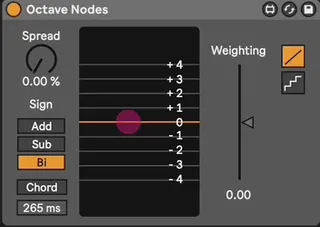
Allows you to offset the octave of incoming MIDI notes or chords according to a weighted distribution of 'nodes'.
Each node corresponds to a possible octave offset from -4 octaves to +4 octaves, with the size of the node representing the likelihood that it will occur.
The distribution of nodes is controlled by:
- Weighting: determines the octave offset which is most likely to occur. Any Spread that is introduced, regardless of Sign, will eminate from this position.
- Spread: determines the distance between the highest and lowest possible octaves offsets.
- Sign: determines the directon of Spread from the most heavily weighted octave offset. Same idea as the Sign control on Ableton's Random device.
Chord mode allows notes that are played together (or within the Chord Buffer time) to receive the same octave offset as eachother.
Open Ableton's Info Text panel for extended descriptions of any of the controls.
Let me know if anything doesn't work as expected or if you've got any ideas on things to add!
Comments (2)
What i need is a device that lets me scan through fifths and octaves with a slider. It's called the feet control on the Yamaha CS-80.
I'm willing to pay of course. Let me know if you're interested.
Best,