- Type
- MIDI Effect
- Author
- hmay001
- Version
- 2.0.1
- License
- None
- Live version
- 11.3.21
- Max version
- 8.5.5
- Downloads
- 702
- Updated
- 2024-05-24
Sometimes MIDI is a MIDI Effect for Ableton Live by hmay001, distributed as freeware, with no license specified by the author. It targets Live 11.3.21 and Max 8.5.5. On maxforlive.com it has 702 downloads. First published 2023-08-16, last updated 2024-05-24. 15 user comments below.
New to Max for Live? Read what MIDI Effects do, how device licenses work, how to install a device.
Description
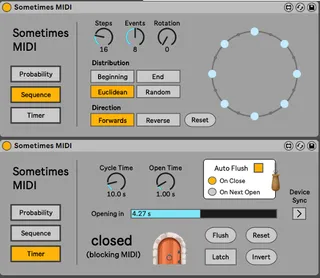
Provides three ways of gating incoming MIDI notes.
PROBABILITY: set the % chance that an incoming MIDI note will play.
SEQUENCE: each midi trigger steps through a sequence of note on/note off events which can be distributed in various ways.
TIMER: gate incoming MIDI based on a timed cycle.
(e.g. accept incoming notes for 20 seconds every minute)
v 2.0.1 updates:
- fixed bug where Sequence and Timer modes were blocking Live's undo/redo.
v 2 updates:
- replaced Counter mode with new Sequence mode. Works the same as Counter if you choose the 'Beginning' distribution but gated notes (now called 'Events') can also be distributed in other ways (End, Euclidean, Random) and the sequence Rotation and Direction can also be controlled.
- fixed bug where device couldnt be duplicated
As always, let me know if any of this doesn't work as expected!
Previous versions can be accessed here if I've missed anything super buggy or your project is looking for a specific version: https://github.com/hmay01/mfl-devices
v 1.3 updates:
- note off messages are always received. Greatly improves the playability of all modes by limiting hanging notes/ reducing the need for Flush.
- Device Sync for the timer mode which allows multiple devices to follow the same timer cycle and share controls. See Ableton info text panel for more details.
v 1.2 updates:
- flush for probability and counter
v 1.1 updates:
- mode selection and parameter values are stored with live set
- mode change does not reset parameter values
- counter and timer cycles are reset on live transport start
- basic 3 bank ableton push integration
- redesigned mode switching/gating
future updates:
- transport sync mode for timer so that open/closed time can be set in beats and notes played on transport start don't sneak through.
- fix track name color when syncing two devices in Timer mode.
Comments (15)
great device!:)
thank you
Besides that, LuckyCola888 is just a spammer promoting casino crap.
https://maxforlive.com/profile/user/LuckyCola888
SPAM is getting massive on Maxforlive.com nowadays.
And they don't offer a proper way to report it, other than a silly 1995-ish "mailto" button which requires an email client.
Maxforlive could easily switch to platform like Wordpress (selfhosted) to avoid spam more easy and let members be able to just click a comment or profile to report it in a single click.