a better search for max devices
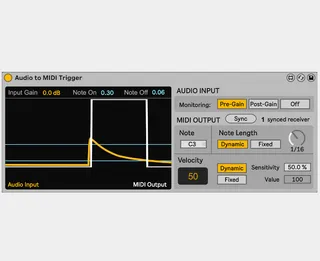
Audio to MIDI Trigger screenshot

Audio to MIDI Trigger

by hmay001

DEVICE NOW DEPRICATED For new updates and to download...

View on maxforlive.com

Type
Audio Effect
Author
hmay001
Version
1.1
License
None
Live version
12.0.5
Max version
8.6.2
Downloads
1,675
Updated
2026-01-19

Description

DEVICE NOW DEPRICATED

For new updates and to download please visit https://tvthumbs.gumroad.com/l/audiotomidi

Cheers!

Comments (13)

  • irishmos · May 11 2025
    It's appearing and seemingly functional in Live 10.1.4 Suite but I hit synch on either, both blink but never synch. I put trigger on an audio track and receiver on a midi with an operator following, no other processors. Synch is definitely seeing each other but not locking in.
  • hmay001 · May 11 2025
    Cheers, I'll get testing it with Live 10 as I've developed in Live 12... will get back to you
  • irishmos · May 11 2025
    dreadlion13 at gmail dot com if you'd like me to test it
  • hmay001 · May 11 2025
    Will send you an email in a minute with the updated version
  • nektaform · June 07 2025
    for Serum FX must have
  • LauryChanty · August 24 2025
    Fantastic module ! But reloading a session disconnect all sync between emiter and receiver, forcing me to re sync all module ... very time consuming and dangerous. Please can you fix that ? It would be wonderful ! Thank you for your work
  • ortensio · November 04 2025
    I also have the same issue, reloading the project has all the synced senders and receivers disconnected. As I'm working with a big number of them it is very inconvenient. any possibility to fix this? Would be awesome if you could fix this
  • hmay001 · November 04 2025
    Hi guys, thanks for bringing this to my attention. Will get this sorted
  • CountDrabula · December 06 2025
    This is a fabulous module! Thank you for making this. To add to the above (I also am encountering the issue with de-syncing upon session reload), it seems that the note-on and note-off thresholds reset to default as well. It would be great if sync and all settings could stay persistent. 
    Another suggestion I wanted to make is for the primary device to be usable without receivers; i.e. a midi track selecting it as a discrete input from the audio channel. I don't know how feasible this is as a concurrent option though. 
    In lieu of the above, this is really the best trigger around that I've seen. It's so great to have a designated note-off level, as it helps prevent false triggers on longer decay sources. Thank you for your great work!
  • drzym · December 31 2025
    Hi. Very good idea for a device! But I found another bug, which makes it kind of unusable :(
    Appart from senders and recievers being disconnectesd on project reload, there is one more problem.
    Note off settings reset as well. For example.: I set up note off treshold to 0.5 and save the project. After reloading it, the device still shows value of 0.5, but in reality it resets to 0 value, so I need to click on the value box to set it again.
    I am on Live 12.3
    Peace!
  • irishmos · December 31 2025
    I'm on Live 11 Suite now and thought I'd try this again.
    Synching up and yet only playing one C3 instead of the simple audio melody
    No clue what I'm potentially doing wrong.
  • hmay001 · January 19 2026
    Hi guys, I really appreciate your patience on this one...I ended up having to overhaul a lot of the syncing logic in order to get it robust and it's been pretty time consuming testing on all different versions of Live etc.
    That said, check out the updated description for a list of improvements in the new version. It's available on my gumroad and will soon be a paid for pair of devices but I will leave it free for a bit for you guys to check out!
    As always any issues just let me know, cheers
  • hmay001 · January 19 2026
    EDIT: I had to make a new upload so here is the link https://tvthumbs.gumroad.com/l/audiotomidi

← Back to search