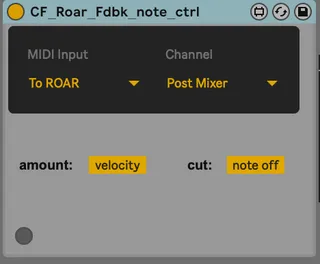
CF Roar Fdbk Note ctrl
Place this device before Roar. It puts Roar automaticall...
- Type
- Audio Effect
- Author
- chapelierfou
- Version
- 1.01
- License
- None
- Live version
- 10.1.18
- Max version
- 8.1.5
- Downloads
- 352
- Updated
- 2024-07-02
CF Roar Fdbk Note ctrl is an Audio Effect for Ableton Live by chapelierfou, distributed as freeware, with no license specified by the author. It targets Live 10.1.18 and Max 8.1.5. On maxforlive.com it has 352 downloads. First published 2024-03-27, last updated 2024-07-02. 4 user comments below.
New to Max for Live? Read what Audio Effects do, how device licenses work, how to install a device.
Description
Place this device before Roar.
It puts Roar automatically in "Note" feedback mode and you can "play" the feedback via MIDI.
You can link the velocity to the amount of feedback and either keep the last value or cut it with notes off.
Make it scream !
Update :
v1.01 amount source (manual/velocity) is properly working if you load Roar when after the device were loaded.
Comments (4)
Same inspiration indeed !
In the end it's the same, it still needs 2 tracks...Well to be precise, in this regard, the method I use is more practical as you can select a MIDI controller directly as a source without any MIDI track.
Also, the "place before Roar" method is more robust (I don't trust choosers with sub menus that rely on track that might be deleted, moved, renamed or whatever).
Am I missing something ? Why would the other method be better ?