Realtime Repitch
This one is kind of hard to explain. Best to just give it a ...
- Type
- Audio Effect
- Author
- Prebentious
- Version
- 1.1
- License
- None
- Live version
- 8.1
- Downloads
- 5,832
- Updated
- 2009-12-03
Realtime Repitch is an Audio Effect for Ableton Live by Prebentious, distributed as freeware, with no license specified by the author. It targets Live 8.1. On maxforlive.com it has 5,832 downloads. First published 2009-12-02, last updated 2009-12-03. 5 user comments below.
New to Max for Live? Read what Audio Effects do, how device licenses work, how to install a device.
Description
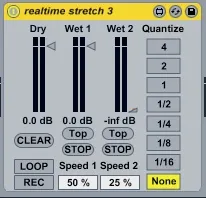
This one is kind of hard to explain. Best to just give it a shot. It'll make sense.
Play some notes into the effect and click the RECORD button.
You will immediately hear your notes repitched as you play.
Set the Speed with the percentage boxes.
Click the TOP buttons to start the sample from the beginning.
Click the STOP buttons to stop playback.
Click the LOOP button to loop playback.
Click the CLEAR button to clear the buffer.
Use the tab to quantize the PLAY, STOP, RECORD, and SPEED controls. The transport must be running to use quantization.
Comments (5)