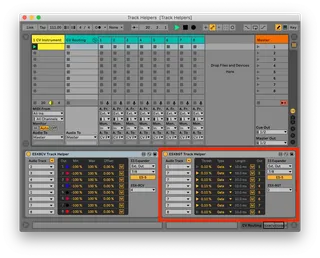
ESX8GT Track Helper Mac
Now works with Apple Silicon Requires Expert Sleepers...
- Type
- Audio Effect
- Author
- bhenry1790
- Version
- 1.0
- License
- None
- Live version
- 12.0.5
- Max version
- 8.6.2
- Downloads
- 99
- Updated
- No Updates
ESX8GT Track Helper Mac is an Audio Effect for Ableton Live by bhenry1790, distributed as freeware, with no license specified by the author. It targets Live 12.0.5 and Max 8.6.2. On maxforlive.com it has 99 downloads. Published 2024-06-28.
New to Max for Live? Read what Audio Effects do, how device licenses work, how to install a device.
Description
Now works with Apple Silicon
Requires Expert Sleepers ES-5 & ESX-8GT expanders.
Use this device with standard Ableton CV Tools to send Gates using the ES-5 or ESX-8GT expanders
Send output from Ableton CV Tools to Audio Tracks in Live, then use the ESX8GT Track Helper to convert the audio signal to gates.
It will create gates from transients in drum audio too!
A little "plumbing" advice:
Create a group of 8 audio tracks. Set the new Audio Tracks to NO INPUT, set monitoring ON.
Drop the ESX8GT Track Helper on the group's master. Choose your ES-5 stereo pair, then your ESX-8GT header.
Choose your 8 audio tracks in the ESX-8GT Track Helper. Now any signal in your audio channels will output to the corresponding jacks!
Let me know if you have any troubles and I'll make a step-by-step video.
You'll need to add the es*encoder~ externals to Max for these to work.
https://www.expert-sleepers.co.uk/downloads.html
Mac location for externals:
Users/Shared/Max 8/Library/
If using with an ES8/9 as an aggregate device turn off DRIFT CORRECTION