Subtractive Looper
A 4-track polyphonic looper that allows you to "subtract" ...
- Type
- Audio Effect
- Author
- tothesun
- Version
- 2.0
- License
- AttributionNonCommercialShareAlike
- Live version
- 11.1.6
- Max version
- 8.1.11
- Downloads
- 387
- Updated
- 2024-07-18
Subtractive Looper is an Audio Effect for Ableton Live by tothesun, distributed as Creative Commons Attribution-NonCommercial-ShareAlike. It targets Live 11.1.6 and Max 8.1.11. On maxforlive.com it has 387 downloads. First published 2024-07-17, last updated 2024-07-18. 1 user comment below.
New to Max for Live? Read what Audio Effects do, what the AttributionNonCommercialShareAlike license means, how to install a device.
Description
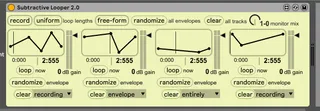
A 4-track polyphonic looper that allows you to "subtract" from each loop by adjusting a simple and intuitive amplitude envelope, featuring sample-accurate interpolation written in gen~, choice of free-form or quantized loops, etc.
This is a 4-track audio looper that can record and loop any audio you send it, just like a looper pedal. Hit "record" to begin recording into the 1st track and then "stop" to stop recording. Hit "record" again to record into the 2nd track; if loop lengths are set to "uniform" it will automatically stop recording when it reaches the same length as the 1st track. Loop lengths can be quantized to the Live transport by selecting the "quantized" option. The "monitor mix" can be adjusted to blend the looping audio with the audio currently entering the device.
The envelope for each track controls its amplitude. In this way, you can carve away at any loops that are playing and "subtract" from them. It can really be fun to see what sort of sounds can emerge when doing this, especially when you just roll the dice and click "randomize".
"Loop now" will immediately restart the track in question at its beginning, which can toss things up in another way, giving interesting outcomes. All controls are MIDI-mappable.A 4-track polyphonic looper that allows you to "subtract" from each loop by adjusting a simple and intuitive amplitude envelope, featuring sample-accurate interpolation written in gen~, choice of free-form or quantized loops, etc.
This is a 4-track audio looper that can record and loop any audio you send it, just like a looper pedal. Hit "record" to begin recording into the 1st track and then "stop" to stop recording. Hit "record" again to record into the 2nd track; if loop lengths are set to "uniform" it will automatically stop recording when it reaches the same length as the 1st track. Loop lengths can be quantized to the Live transport by selecting the "quantized" option. The "monitor mix" can be adjusted to blend the looping audio with the audio currently entering the device.
The envelope for each track controls its amplitude. In this way, you can carve away at any loops that are playing and "subtract" from them. It can really be fun to see what sort of sounds can emerge when doing this, especially when you just roll the dice and click "randomize".
"Loop now" will immediately restart the track in question at its beginning, which can toss things up in another way, giving interesting outcomes. All controls are MIDI-mappable.
Comments (1)
This white text trend is pointless and impractical and it should be ended.