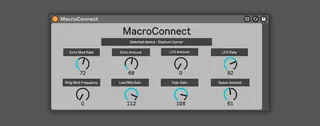
MacroConnect
MacroConnect is a Max for Live device that automatically map...
- Type
- Audio Effect
- Author
- Loukas
- Version
- 1.0
- License
- None
- Live version
- 12.0.5
- Max version
- 8.6.2
- Downloads
- 127
- Updated
- 2024-07-15
MacroConnect is an Audio Effect for Ableton Live by Loukas, distributed as freeware, with no license specified by the author. It targets Live 12.0.5 and Max 8.6.2. On maxforlive.com it has 127 downloads. Published 2024-07-15. 11 user comments below.
New to Max for Live? Read what Audio Effects do, how device licenses work, how to install a device.
Description
MacroConnect is a Max for Live device that automatically maps itself to the first 8 macros of the selected device. Simply map the controller of your choice to the 8 knobs of the MacroConnect and you will be able to automatically control every first 8 parameters (macros if it's an audio effect rack) of the selected device.
Please consider rating the device on gumroad.
If you have any questions/feedback/issue don't hesitate to email me at [email protected]
Release notes :
07/15/2025 - Audio will pass through
Comments (11)
When you’re ready for a break from music, dive into the world of online gaming at https://aud33.casino/. Log in aud33 casino to discover their amazing selection of games and slots!
I want to use this utility as a way of seeing what params are mapped to my hardware controller with 8 knobs.
Would you be willing to make a version of this that opens up in a floating window like this:
https://www.youtube.com/watch?v=zlfQ0CNe_xc
That way I can have it open on my second monitor at all times.
You can see all of this by testing with the built-in "Compressor" device. I'm also using the latest version of Ableton Live 12.
According to this doc: https://docs.cycling74.com/max8/vignettes/live_parameters
You should only have to worry about three different parameter types:
integer: integer values with a range of up to 256 values (default 0-255)
floating-point: floating point values (no range restriction)
enum: an enumerated list of items
Also, if you do implement the floating window idea, I would also suggest making a variant that has 16 knobs arranged in 4x4, since that's a fairly popular controller format (i.e. https://www.midifighter.com/shop/midi-fighter-twister).