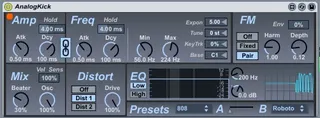
SubtleSonic AnalogKick
AnalogKick is a bass drum synth based on the design of the T...
- Type
- Instrument
- Author
- PeterMcCulloch
- Version
- 1.0.1
- License
- AttributionNonCommercialNoDerivatives
- Live version
- 8.2.2
- Max version
- 5.1.8
- Downloads
- 38,732
- Updated
- 2014-06-24
SubtleSonic AnalogKick is an Instrument for Ableton Live by PeterMcCulloch, distributed as Creative Commons Attribution-NonCommercial-NoDerivatives. It targets Live 8.2.2 and Max 5.1.8. On maxforlive.com it has 38,732 downloads. First published 2012-03-07, last updated 2014-06-24. 30 user comments below.
New to Max for Live? Read what Instruments do, what the AttributionNonCommercialNoDerivatives license means, how to install a device.
Description
AnalogKick is a bass drum synth based on the design of the TR-808's bass drum, and is capable of producing sounds quite similar to the original.
It also adds features not found in the original, including FM and distortion, as well as adding the ability to change the tuning curve of the oscillator envelope to adjust the snappiness of the attack. Since it has key-following, you can use it as a percussive synth with FM.
It has built-in presets and the ability to morph between them easily.
Check out my other devices here:
http://www.maxforlive.com/library/index.php?by=author&q=PeterMcCulloch&submit=Search
Full documentation is available on the website.
Video available at www.facebook.com/subtlesonic
Comments (30)
I recently bought the EKS kick, but no preset morphing. I may end up using this a lot.
THANKS!
Please feel free to rate it; it'll make it easier for others to find...
If they are, then this seems feasible, though it will require a little extra handling, but I'll check into it. If it works, what I suspect it will be will be something of the format: store presets as a separate file somewhere on your harddrive, device stores a line of text with the path to that file, loads presets from there. Things are busy now, but I'll look into it, as this is a functionality I'd like to have. Interested in beta-testing?...
Gnib
However, I stopped using it because of the inability to save presets or have Live preserve the parameters in a saved set.
The only workaround I used for a bit was to "static-automate" every parameter that isn't loaded with the device already, and even then it's a headache to adjust from then on if need be, as I'm sure you can imagine.
Can you PLEASE try to work out the saving issue? I am extremely grateful you've shared this with all of us, and would gladly pay for this device if you could fix this problem.
Thanks so much, either way.
Thanks. Here's the current problem: preset interpolation is incompatible with automation. I've looked at a number of ways to handle this, but it just manages to mess everything up.
What I'm leaning towards is just stripping the interpolation code out, and saving the presets as device presets (outside of the device). You could then just use a third-party device interpolator.
Would that work?
I too would like to see the setting saved with each Live set, that feature would make this device part of my template Live set and increase it's usefulness tenfold. In answer to your question above, would it work to take the interpolation code out in order to get automation and saving of settings, I would say yes, definitely.
For the people who want Ableton to recall the device state - just go into the max editor and click out of presentation mode and delete the preset handling section.
What was happening is that the presets were overriding the save state. I don't want the preset handling so instead, now I have a saveable drum synth.
I'm having some difficulties on saving my personal patches / recalling projects.
Whenever a new project is loaded...it starts with some of the presets already stored in the plugin (808 to be more specific).
I've tried saving a patch directly has an "ableton file", and when I reload it, it opens up the same presets stored in the max device.
Is there a way to recall a personal preset, or to store it anywhere?
You will laugh...but untill now, I've taken snapshot pictures and when opening it again...I re-do everything over and over (as in the picture).
This is a pain in the *ss and I realy love this max device for kicks.
I have tried going to the max editor to delete the preset handling section, but I cannot delete (unfortunately I do not understand quite well Max's inside capacities.
Hope to get some help from you guys
Cheers!
I'm having some difficulties on saving my personal patches / recalling projects.
Whenever a new project is loaded...it starts with some of the presets already stored in the plugin (808 to be more specific).
I've tried saving a patch directly has an "ableton file", and when I reload it, it opens up the same presets stored in the max device.
Is there a way to recall a personal preset, or to store it anywhere?
You will laugh...but untill now, I've taken snapshot pictures and when opening it again...I re-do everything over and over (as in the picture).
This is a pain in the *ss and I realy love this max device for kicks.
I have tried going to the max editor to delete the preset handling section, but I cannot delete (unfortunately I do not understand quite well Max's inside capacities.
Hope to get some help from you guys
Cheers!
I'm having some difficulties on saving my personal patches / recalling projects.
Whenever a new project is loaded...it starts with some of the presets already stored in the plugin (808 to be more specific).
I've tried saving a patch directly has an "ableton file", and when I reload it, it opens up the same presets stored in the max device.
Is there a way to recall a personal preset, or to store it anywhere?
You will laugh...but untill now, I've taken snapshot pictures and when opening it again...I re-do everything over and over (as in the picture).
This is a pain in the *ss and I realy love this max device for kicks.
I have tried going to the max editor to delete the preset handling section, but I cannot delete (unfortunately I do not understand quite well Max's inside capacities.
Hope to get some help from you guys
Cheers!
Great device!
But.. cant use it- Having the same problem as Pedrogoya in the comment above.
Its also doing a full reset when trying to change from A to B.
I went for recording audio instead of snapshot.. but its really not worth it like this.
Thanks
The thread is old so i'm guessing it has not been sorted?