a better search for max devices
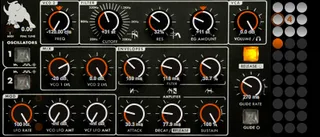
Minotaur screenshot

Minotaur

by veedjee

Minotaur is a basic synth device inspired for the fun by the...

View on maxforlive.com

Type
Instrument
Author
veedjee
Version
1.01
License
AttributionNonCommercialShareAlike
Live version
8.2.8
Max version
6.0.4
Downloads
10,324
Updated
2014-10-06

Description

Minotaur is a basic synth device inspired for the fun by the last moog synth !

specs:

- 2 oscillators saw/square with pwm

- 1 lfo with sync to modulate filter, amp and pwm

- 1 filter's with settings when clicking on the beast ;)

- Polyphonic capabilities, select how many voices do you want

- Presets with morphing use [maj+click] on a circle to save preset, and [maj+alt+click] to erase one)

- Include help annotations inside Live [maj+?]

-----------

Reduce the number of voices to lower cpu consumption.

It requires Max 6 because the use of gen and the PM.ladder~ externals downloadable here:

http://cycling74.com/toolbox/pm-ladder-moog-ladder-filter/

Once you have downloaded the file, place the PM.ladder~ files in a folder listed in your Max Path, see the File preferences.

------------

Hope you'll have fun with it !

If you use it, please rate it ! ;-)

Check my others devices here:

http://www.maxforlive.com/library/index.php?by=any&q=veedjee&submit=Search

Update:

v1.01

- Fix pwm's bug

Comments (18)

  • PeterMcCulloch · February 27 2012
    Sounds good and fun to play.
  • troll · March 01 2012
    question can you use max6 runtime and max4live? to get this to work without buying max 6?
  • veedjee · March 01 2012
    Not tried but I do not think this is possible, here is an excerpt from the faq on cycling74: "Gen works within Max for Live with a full Max 6 license."
    ++
  • yeaitsme07 · March 02 2012
    how do you save your patch. i see all the preset circles and then all the blank ones but i got no idea how to save it
  • veedjee · March 03 2012
    Hi, use (maj+click) on a circle to save preset, and (maj+alt+click) to erase one. have fun !
  • akninganng · March 03 2012
    Where I have to install pm-ladder-moog-ladder-filter ?
  • veedjee · March 03 2012
    Once you have downloaded the file, place the PM.ladder~ files in a folder listed in your Max Path, see the File preferences.
  • MadeInMachines · January 28 2013
    How difficult is it to make a max4live OB-8 editor for someone who has never used max. I saw yours and got inspired to try and get hold of one or make on to make it integrate perfectly into my DAW. How do you do it?
    Thanks
  • veedjee · March 25 2013
    Hi MadeInMachines, this device is a synth and not an editor. To build you own device, check the tutorials on the net to get the basics of Max and try the Cycling's forum. Good luck, bye
  • tenderosa · July 19 2013
    This synth sounds fantastic, I've spent a lot of time playing it & modulating it with different things in live. Thanks for making it.
  • primat · March 17 2014
    Very nice bass synth. Thank You
  • CaligulaCuddles · November 20 2017
    Yo, I'm late to the part on this one (by a few years), but man... what a killer effing synth! Very simple and distraction-free. It's nice having a really simple tool with a relatively straightforward function that I can jump to when I need it. It really holds up like a beast on the low end, and can get some rather BoC-inspired sounds with a few simple tweaks.
  • QBX · December 10 2020
    Great work! This should be considered a choice in the best digital emulations of the mini moog sound!
  • MS2000Love · June 13 2021
    Is there anyway to enlarge the Minotaur? I love it, but can barely read the words on it for the life of me.
  • veedjee · June 14 2021
    Hello MS2000Love, if ever, you can find the name and description of the dials in the help section integrated into Live at the bottom left.
  • Autosad77 · September 18 2022
    Hey! I know I'm late to this, but I just wanted to thank you so much for making this synth! I didn't think I was gonna enjoy it half as much as I did! This is seriously the best Max synth in the game right now. It should be at the very top of the list. I can't believe it's free. A lot of time went into the detail, and parameters, and interface. I used it in a track of mine, and with some tweaking, it sounds damn analog! Thank you. You should consider releasing this as a VST.
  • vh · October 03 2022
    +1 was Autosad77 sagt .& .. Thx 4 this Synth
  • tajnost · September 19 2023
    Hi! Could you please update this little gem to make it work with Push 3 in standalone mode. Now it loads and plays but controls are hidden : (
    One of the best sounding if not the best m4l synth at the time! Really want to have it available in standalone mode.
    Also if you could, please consider making another m4l synth, like polyphonic Juno 60, or Memorymoog for example, with huge sound, minimal controls and fast workflow! 8>

← Back to search