MIDI Note Latch
Holds note(s) on until the same note(s) are pressed again, e...
- Type
- MIDI Effect
- Author
- noach
- Version
- 1.0
- License
- None
- Live version
- 8.1
- Downloads
- 1,777
- Updated
- 2009-12-02
MIDI Note Latch is a MIDI Effect for Ableton Live by noach, distributed as freeware, with no license specified by the author. It targets Live 8.1. On maxforlive.com it has 1,777 downloads. Published 2009-12-02. 9 user comments below.
New to Max for Live? Read what MIDI Effects do, how device licenses work, how to install a device.
Description
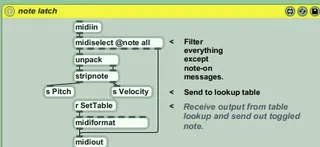
Holds note(s) on until the same note(s) are pressed again, effectively making a note into a toggle rather than a momentary switch. Latch is different from sustain, in that the on/off values of notes can be controlled individually. The patch demonstrates the use of midiselect and midiformat, stripnote, flush, pack and unpack, table, send and receive.
Two issues remain, for which I'd appreciate any help or comments: how to control presentation/patcher layers so that not everything is shown in the Live window, as now; and how to encapsulate the device so that it can be instanced on more than one track at a time.
Comments (9)
To change it so that you only have the things you want in the device window, add those specific things to "presentation mode" in max, and under "patcher inspector" turn on the option to "open in presentation mode" by default.
To change it so that you can have multiple instances, change your send / receive objects to this format [s ---Pitch], [s ---SetTable] and [r ---Pitch], [r ---SetTable] and so on. That will make those routing paths unique for each instance.
Is there an RSS feed for this site?
noach
I've been looking for this exact functionality, and I'd really like to use this.
Any help?
I have 16 drum loops (4 bars each) set up in a drum rack. Your patch lets me latch each loop effortlessly.
Except I have to remember which key I'm looping every time I launch a new loop, and UN-latch it.. getting the timing just right for the on/off switching is tricky.
How can I have each incoming midi note clear the previous latch automatically? Any assistance or advice would be appreciated.. I don't program m4L yet.. :)
about your questions :
to make a "s" and "r" local to a patcher, just prefix the name with "---" like so r ---Velocity
about opening in presentation mode, right click the background of your patch, select "patch inspector" and then activate "open in presentation". (how intuitive !)
cheers
mots
Great device, specially that it looks like the only one existing that can do what it does.
Is there any plan to fix the apparence ?