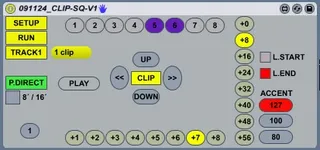
CS Step Sequencer - Phatlines MODs3
This is my mod of the "Sequencer SC". VERSIONS: ...
- Type
- MIDI Effect
- Author
- Phatline
- License
- None
- Live version
- 8.1
- Downloads
- 2,711
- Updated
- 2010-05-24
CS Step Sequencer - Phatlines MODs3 is a MIDI Effect for Ableton Live by Phatline, distributed as freeware, with no license specified by the author. It targets Live 8.1. On maxforlive.com it has 2,711 downloads. First published 2009-11-26, last updated 2010-05-24. 11 user comments below.
New to Max for Live? Read what MIDI Effects do, how device licenses work, how to install a device.
Description
This is my mod of the "Sequencer SC".
VERSIONS:
V1
http://www.phatline.at/m4l/CLIP-SQ-V1-APC.amxd
http://www.phatline.at/m4l/V1.png
Works with APC standalone.
V2
http://www.phatline.at/m4l/CLIP-SQ-V2.9-APC&LP.amxd
works only with a APC & a LP, it only works if you have twice!
V3
http://www.phatline.at/m4l/CLIP-SQ-V3-2xLP-vertical.amxd
http://www.phatline.at/m4l/V3.png
works with Launchpads... you can use 2 LP vertically! ore 1 Standalone!
Comments (11)
i dont understand..
i cant get it started, and i dont understand step 6 . "select controls for running light"
can someone help me... ??
http://www.phatline.at/m4l/CLIP-SQ-V2.amxd
its the V2 and in much points preconfiguratet for the APC ---but for Launchpad you will have problems... i dont support it -but in future...
mark:
http://www.phatline.at/m4l/CLIP-SQ-V2.amxd
press:
strg c
go to your browsers adress line, clear it, then press:
strg v
get it?
Thanks Very Cool and Havy ;-) Thanks for your Work !!!
mfg,
j
Thanks again,
T.Cress
(download works)
should be more stable! and have more functions:
LP: Vol - Clear Button
LP: Pan - Copy the first 8 steps to the next 64
LP: Snd B - Copy all Clip Data in a temp - coll
LP: Snd A - Paste all Clip Date from the temp Coll to the clip.
LP: Learn - Set Velocity 60
LP: View - Set Velocity 90
LP: Page Left - Set Velocity 127
LP: Page Right - Play button (active by turned off Autoplay button)
LP: Session - Autoplay
LP: Autopage - switch dependend of the loop length the pages autoamticly
APC: Track Stop Buttons - select Pages (SHIFT: select clips)
APC: Master Stop Button - Shift switch (not a toggle - a button!)
APC: Scene Launch Buttons - select Pages (Shift: clip banks)
APC: Solo Button - Set loop length stepwise (Shift: 8 Steps @ once)
APC: Rec LEDs - indicates Running LED
Prepare the Liveset:
Make a new Miditrack - it must be the first Miditrack!
Make now 64 new empty miditracks.
Activate the APC as Controllsourface in Midi options
Press the Rescan Button, the select APC and the Launchpad. turn on the Max Device....
-Now Learning by doing!