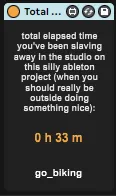
Total Time Spent On Project
track the time u spent toiling away on ur nxt ambient banger...
- Type
- Audio Effect
- Author
- offthesky
- Version
- 1.0
- License
- None
- Live version
- 12.0.5
- Max version
- 8.6.2
- Downloads
- 432
- Updated
- 2024-08-29
Total Time Spent On Project is an Audio Effect for Ableton Live by offthesky, distributed as freeware, with no license specified by the author. It targets Live 12.0.5 and Max 8.6.2. On maxforlive.com it has 432 downloads. Published 2024-08-29. 3 user comments below.
New to Max for Live? Read what Audio Effects do, how device licenses work, how to install a device.
Description
track the time u spent toiling away on ur nxt ambient banger. with useful random notes like "eat a salad" or "do some stretches".
note: this device creates an undo point by recording the time every 60 seconds, so when you save then restart your project it will retain the last minute.
comes in audio and midi variants woohoo.
credits:
mostly borrowed code from here: https://maxforlive.com/library/device/8411/project-timer - although the problem with that one is that it stops working after a few minutes if the transport is not playing. i spend a lot of time patching in cardinal vcv plugin with the transport off, doing generative self running nonsense. so i needed something that just kept working as long as ableton is open.
also i should mention: this other device by tomcosm is also a great freebie for tracking project stats: https://maxforlive.com/library/device/5337/track-stats-lite
Comments (3)
I've used it to make my own device calculating the rate per hour according to the budget I have on the project (can't believe a plugin company charge this function 50$/€)
There's only one problem : with the time saving action (at each minute passing), if it occurs when you're undo/redoing stuff, it can ruin some work.
Have you got a workaround for this ?
Otherwise it's really great :)
one rough idea: you can always hack into this m4l device yourself and change the 'counter' object (that lives within the "p PtStorageClock" subpatch) to something higher than "60" - say "300" (= 5 minutes)? that way it only creates a single undo point in your project every 5 minutes . of course then it will only store/display up to the last 5 minutes of work you've done, when you reopen the project. so there's that.
the only other possibly better way i could think of would be to create a whole new version of this patch, that writes each minute to a new line in an external text file. of course that doesn't give you the time display right there in the m4l ui (which i think is useful to have). but sadly i don't have time to research/create something that robust.
I figured this could not be avoided without compromising the very purpose of the device
Thanks for the reply and details !
I will probably upload my version some day (need to clean the patch and translate text and currencies), and I will credit you of course