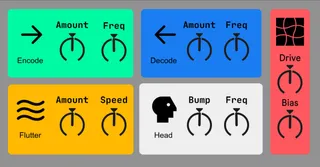
ToTape7 Wrapper
This is a simple wrapper for AirWindows superb ToTape7 VST...
- Type
- Audio Effect
- Author
- Absolute001
- Version
- 1.0
- License
- None
- Live version
- 12.0.5
- Max version
- 8.6.2
- Downloads
- 299
- Updated
- 2024-09-14
ToTape7 Wrapper is an Audio Effect for Ableton Live by Absolute001, distributed as freeware, with no license specified by the author. It targets Live 12.0.5 and Max 8.6.2. On maxforlive.com it has 299 downloads. Published 2024-09-14. 1 user comment below.
New to Max for Live? Read what Audio Effects do, how device licenses work, how to install a device.
Description
This is a simple wrapper for AirWindows superb ToTape7 VST
ATTENTION! YOU NEED TO INSTALL THE VST IN ORDER TO USE THIS WRAPPER
DOWNLOAD: https://www.airwindows.com/totape7/
Many thanks to Chris for his amazing work
Step 1
First, load the .amxd file into Live, then click the Max For Live
icon to open the Max editor.
Step 2
Once the Max Editor has opened click the Unfreeze and
Presentation Mode icons in the bottom left.
Step 3 & 4
Click the Lock icon in the bottom left (make sure its locked),
then find the little box that says 'plug' and click that. This will
open your system's file browser where you can navigate to the
plugin file.
Make sure you select the correct plugin format for the wrapper
version you're using (AU, VST, VST3).
Finally, click the Lock icon, the Presentation Mode icon and the
Freeze Icon again (so they look like the image above), then File
→ Save and close the Max Editor.
This is now a custom version of the wrapper (the original .amxd
file) that has your custom location stored within the device. Use
this as you would any other Max For Live device.
I'd recommend making a backup of the .amxd file. If you ever
need to reinstall or change the plugin's installed location you'll
need to repeat these steps.
Comments (1)