Chiastic Slide10
Smoothly crossfade between multiple chains in a rack or chil...
- Type
- Audio Effect
- Author
- zsteinkamp
- License
- AttributionNonCommercialShareAlike
- Live version
- 12
- Max version
- 8.6
- Downloads
- 0
- Updated
- 2025-02-27
Chiastic Slide10 is an Audio Effect for Ableton Live by zsteinkamp, distributed as Creative Commons Attribution-NonCommercial-ShareAlike. It targets Live 12 and Max 8.6. First published 2024-09-10, last updated 2025-02-27. 6 user comments below.
New to Max for Live? Read what Audio Effects do, what the AttributionNonCommercialShareAlike license means, how to install a device.
Description
Smoothly crossfade between multiple chains in a rack or child tracks in a group.
Add this device to a Group Track or immediately after a rack device such as Audio Effect Rack or Instrument rack.
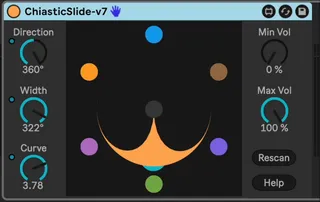
Chains or child tracks are shown as colored balls on the perimeter of a circle. You can control a virtual mic with the Direction control. The "pickup pattern" of the mic can be controlled with the Width and Curve controls.
This allows you to have multiple chains of parallel material, instruments, or effects and fade between them while time marches forward.
I created this plugin when I saw that the Abelton's Rack devices (Instrument Rack, Audio Effect Rack) Chain Selector parameter only controlled input rather than output. I was looking to have any number of sounds playing simultaneously, but be able to smoothly fade between them without disrupting time.
More at:
https://plugins.steinkamp.us/m4l-ChiasticSlide
I have many other free and open source Max For Live devices. Learn about them here:
https://plugins.steinkamp.us/
Comments (6)
@dayjob -- Indeed!
Happy to get your feedback on the device. :)