Where Am I
Where Am I is a free Max For Live utility device that displa...
- Type
- Audio Effect
- Author
- ChipPanFireDotCom
- Version
- 1.1.0
- License
- None
- Live version
- 8.2.2
- Max version
- 5.1.9
- Downloads
- 6
- Updated
- 2016-03-15
Where Am I is an Audio Effect for Ableton Live by ChipPanFireDotCom, distributed as freeware, with no license specified by the author. It targets Live 8.2.2 and Max 5.1.9. On maxforlive.com it has 6 downloads. First published 2012-04-18, last updated 2016-03-15. 6 user comments below.
New to Max for Live? Read what Audio Effects do, how device licenses work, how to install a device.
Description
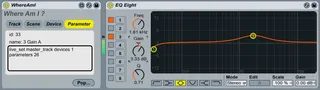
Where Am I is a free Max For Live utility device that displays Live API information for the currently selected element of the Ableton Live interface.
The device is implemented as an Max Audio Effect, and can sit on any track. It monitors the following Live API properties:
- currently selected track
- currently selected scene
- currently selected device
- currently selected parameter
A floating window gives the id, name and path of the selected Live interface element. The device can be used to quickly determine a hook (id or path) to a given element that you may want to interact with in your own Max For Live device (via the Live API)
Full details, documentation and free download at:
http://chippanfire.com/m4l-where-am-i
Updates:
V1.1.0
- Device no longer fills Lives undo buffer when observing changes in selected track/device/etc
Comments (6)