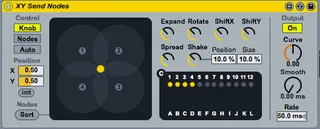
XY Send Nodes revised
This device allows you to control the Send Nodes device in a...
- Type
- Audio Effect
- Author
- cosmoddd
- Version
- 1.01
- License
- None
- Live version
- 8.2.8
- Max version
- 5.1.9
- Downloads
- 3,979
- Updated
- 2013-09-09
XY Send Nodes revised is an Audio Effect for Ableton Live by cosmoddd, distributed as freeware, with no license specified by the author. It targets Live 8.2.8 and Max 5.1.9. On maxforlive.com it has 3,979 downloads. First published 2012-04-18, last updated 2013-09-09. 24 user comments below.
New to Max for Live? Read what Audio Effects do, how device licenses work, how to install a device.
Description
This device allows you to control the Send Nodes device in an XY fashion, rather than the Distance / Azymuth method pre-packaged in Max4Live. Map your TouchOSC or Lemur XY controller (or Joystick, or Wiimote) to this and now you have XY control of how tracks are bussed to Live's sends. Applications for this could go much farther, of course ;).
check http://cosmod.net if you have further questions / issues.
UPDATE:
If you want to use more than one instance of this patch for discrete midi controls on each instance, download the patch below. It's basically the same patch with an updated back-end tweak in Max.
https://www.sugarsync.com/pf/D816975_78545831_768231
The objects that deal with sending and receiving of midi (s node_xy) and (r node_xy) have been renamed to (s node_xy_1) and (r node_xy_1), respectively. For the sake of visually standing out in the patch, these objects are colored in yellow and outlined in purple.
If you want to keep creating instances of this patch without midi overlapping, continue changing the names of the (s node_xy) and (r node_xy) objects for each patch, as I did for this one.
hope this helps.
Comments (24)
I'd like to rotate the sound, so I put a line ramp on the rotate knob. It works but too fast and if I change the line ramp it doesn't change the rotation speed... Can you help me?
http://www.maxforlive.com/library/device/1286/xy-send-nodes-circlepan-amxd
thanks a lot !
i'm designing my own spatialization interfaces on Lemur and I was desperate not to be able to control that wonderful multichannel send nodes because it was receiving A and D, only.
And you did it.
great !
I was achiveing circular animation with this setup.
http://wwhub.s3.amazonaws.com/Ableton_surround_template_XY-Send-Nodes.png
And you can animate interesting chapes by setting different rates between the two LFOs and altering the Phase.
However it does suffer from sharing the "Knob" POSITION variables in global space. This means that if you have two instances of the device, they both fight to update the same coordinates as the knob position is animated. Effectively limiting you to one XY Send Nodes device per set.
Someone needs to find a way to move the X and Y position variables into the scope of the device instance. Whilst I have experience as a programmer, I am a straight up n00b with Max so I have no idea. I need to start learning this thing.
anyway, there it is. We're limited to only using 1 per set if we want to animate.
i want 8 channels in circle. it works but when i move from 1 to 2 for exemple there's no "virtual center" between 1 and 2. if i increase the SPREAD so the zones between 1 and 2 are crossed i get little more center but really not enough compared to 1 or 2 alone! so it sounds like the sound is decreasing between 1&2 the only way to get it is to push spread very high but then my sound goes to all the channels.
anyway having one instance per set makes it totally useless for me.
i just bought mx for live for this tool :/
I have two audio tracks in my Live project.
On each of these tracks I insert a xy send nodes plugin.
I'm trying to command these xy send nodes with a midi controller such as midi touch or lemur. Both apps do have xy pads . I'm sending different midi CC from these controllers, each different , so there are 2 x, y parameters on 4 different midi CCs.
all x parameters react together , even if they have different midi channels and CC numbers.
and it's the same for y parameters
so you cannot spatialize each track independently
Nb : if you try this with the Multichannel send nodes plugin, it doesn't happen. midi channels and CC numbers are well recognized.
So I think it's possible to do it with xy send nodes plugin.
Can you do this, Cosmoddd ?
With this correction, your patch will be very useful for at least 3 persons on this list and I myself know 10 musicians waiting for that, but I estimate there could be hundreds of them, that we don't know
If you want to use more than one instance of this patch for discrete midi controls on each instance, download the patch below. It's basically the same patch with an updated back-end tweak in Max.
https://www.sugarsync.com/pf/D816975_78545831_768231
The objects that deal with sending and receiving of midi (s node_xy) and (r node_xy) have been renamed to (s node_xy_1) and (r node_xy_1), respectively. For the sake of visually standing out in the patch, these objects are colored in yellow and outlined in purple.
If you want to keep creating instances of this patch without midi overlapping, continue changing the names of the (s node_xy) and (r node_xy) objects for each patch, as I did for this one.
hope this helps.
here is a version 3 of cosmodd 's xy send nodes : after we made a few corrections, it works very well.
https://dl.dropboxusercontent.com/u/20816103/XY_Send_Nodes_3.amxd
you can put it on several tracks and go in the patch to change numbers in the yellow objects, like cosmoddd explains just above.
No trouble, I'm not a great Maxer at all and I managed to do it.
You can even save any versions of the plug in with different numbers like cosmodd explains and they will be ready to use in any of your projects.
https://www.dropbox.com/s/4vpmpze1h673wlw/XY_Send_Nodes_3.amxd
Must be possible : as I said, I'm not a great maxer at all , so I didn't succeed.
I tried the same modifications we did with cosmodd on the standard xy_send_nodes_3, but it doesn't change anything.
Thanks in advance if somebody could help
http://www.maxforlive.com/library/device/1286/xy-send-nodes-circlepan-amxd
If you want to keep creating instances of this patch without midi overlapping, continue changing the names of the (s node_xy) and (r node_xy) objects for each patch, as I did for this one."
couldn't you just rename them "s ---node_xy") and "r ---node_xy) and let Max do the job for you ?
did you try ?
let me know if it works
many thanks in advance
try to check your buffer size in Live preferences, perhaps it's too small.
Do you have this distortion also when you pan fast, or when you move your fader track very quickly ?
Im a noob at max, so i hope you can help me?
Thanks in advance.
Chr5500
Im a noob at max, so i hope you can help me?
Thanks in advance.
Chr5500
change 1 in 2 for track 2 , 1 in 3 for track 3 etc...