a better search for max devices
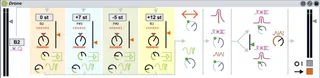
Drone screenshot

Drone

by SufiPlugIns

A semi-modular style drone generator with 4 pulse-width-modu...

View on maxforlive.com

Type
Audio Effect
Author
SufiPlugIns
Version
1.0
License
AttributionNonCommercialShareAlike
Live version
8.1.4
Max version
5.1.3
Downloads
8,321
Updated
2012-09-14

Description

A semi-modular style drone generator with 4 pulse-width-modulated oscillators, overdrive, and parallel high and low band-pass filters.

Instructional video: http://youtu.be/fvne71CNsCo

You can also download all 7 Sufi Plug Ins from our website, in the form of an ALP (Ableton Live Project) demo song. http://www.beyond-digital.org/sufiplugins/download/

Comments (9)

  • lazzy8 · May 11 2012
    I just downloaded this instrument and set the settings exactly like they were in this video:http://vimeo.com/41943354 and my "drone" sound sounds nothing like it did in the video. It's a shame because the drone sound in the video sounded really great.
  • PeterMcCulloch · May 15 2012
    The drone in the video seems to be using a healthy bit of reverb. Throw the cathedral reverb after it and it'll work better.
  • SufiPlugIns · May 19 2012
    If you'd like to get the exact drone settings/song, you can download our "demo song" from the Sufi Plug Ins website:
    http://www.beyond-digital.org/sufiplugins/download/
    It is an ALP Live Project file which contains some examples of the synths playing, and then the drone piece featured in the video. (We used reverb and some phaser too I believe.)
  • PaleFire · May 25 2012
    Thanks so much for this ....very retro drones and works a treat with lfo making the timbre move
  • gimboland · May 30 2012
    Really nice device - thanks! Only one problem: as far as I can see, only the overall level and the LPF are automatable. Is there any way round this? I tried wrapping it in a group but that only allows me to automate 8 more parameters - and I'd really like to be able to automate them all!
  • gimboland · May 30 2012
    Sorry, I should correct myself/clarify: the parameters are all automatable in the arrangement view - but you can't access them in clip envelopes, it seems...? Apologies for confusion.
  • SufiPlugIns · June 05 2012
    We are aware of this issue and are working on it. As a workaround, you can make an instrument rack and assign the parameters you want to automate to the macro knobs and automate those. We will post a fix as soon as we have one.
  • EZTouch · July 19 2013
    Hi,
    Any way to save presets?
    That would be perfect
    Great device
  • osmanaustin · January 04 2023
    Would be great if someone updated this device to work on Live 10/11 !

← Back to search