SoftStep4Live
The softstep has a lot of possibilities, especially since it...
- Type
- MIDI Effect
- Author
- jengel
- Version
- 1.0
- License
- AttributionNonCommercialShareAlike
- Live version
- 8.3
- Max version
- 5.1.9
- Downloads
- 623
- Updated
- 2012-06-12
SoftStep4Live is a MIDI Effect for Ableton Live by jengel, distributed as Creative Commons Attribution-NonCommercial-ShareAlike. It targets Live 8.3 and Max 5.1.9. On maxforlive.com it has 623 downloads. First published 2012-06-04, last updated 2012-06-12. 16 user comments below.
New to Max for Live? Read what MIDI Effects do, what the AttributionNonCommercialShareAlike license means, how to install a device.
Description
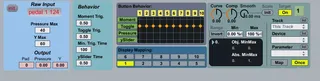
The softstep has a lot of possibilities, especially since it can be scripted in MaxMSP.
This device is designed to be an easy interface between the softstep and live, using the modified liveAPI (http://www.maxforlive.com/library/device/1154/a-better-api), and Tom Swirly's excellent softstep.jso. (http://forum.keithmcmillen.com/viewtopic.php?f=40&t=535).
This format circumvents the need to use KMI's flawed software and should work as a good jumping off point for anyone interested in doing more custom control/display. I hope you find it useful, and do let me know what you're using it for and feel free to alter it as you like.
At the moment, TomSwirly's javascript file doesn't quite work with M4L's (midiin/midiout) objects, so I had to swap in Leigh Hunts essential (lh_midiin/lh_midiout) externals (http://web.mac.com/leighhunt/iWeb/Site/downloads.html), which are unfortunately MAC only. That's why this is a work in progress.
That makes a lot of included externals and bpatchers, so let me know if the "freeze device" didn't work.
Comments (16)
I've uploaded the freezed version, let me know if it works for you. Failing that, you can download the externals from the links I provided in the description.
It would be easy to change the device to allow for more than one functionallity, and feel free to modify the device to suit your specific needs.
I'm currently working on a version that is more specifically centered around communicating with loopers, but still with a single functionality per a button. Cheers!
I was about to ditch my softstep, but this makes it so easy to set up.
Just one question, how can I set this up to launch clips?
Keep up the good work you are doing with this :)
Thanks so much for this phenomenal device. I've been experimenting with finding a way to customise how I control the Looper device using the Softstep and having the Softstep lights light up based on what the Looper is doing and your work has helped me to get extremely close to this.
I'm finding that when I map softstep pads to some live.text buttons (that control a logic circuit that in turn controls the looper's play, stop, rec and odub state), the softstep pads produce some unexpected results. When I click the live.text buttons with the mouse, I get the intended behaviour but when I step on the softstep, the behaviour seems almost random.
Would you be interested in taking a look and helping me figure out where I'm going wrong? I'd be so grateful. Just let me know where I should send the live set.
Thanks again for your awesome work!
Cheers
I'd be happy to take a quick look when I get the chance. The easiest way would be to create a public dropbox or google drive folder and post the link here.
Cheers,
Jesse
Thanks for the offer of help. I've saved a Live set here:
https://drive.google.com/folderview?id=0B3nMMseX9KpXemhnTUU3bUVVUWc&usp=sharing
It contains a set up in which the Softstep controls each of the devices in the midi channel that in turn control the loopers in each of the audio channels.
When I use the softstep4live device instead of the Softstep Editor as host for the board there are some unexpected button presses being registered. Specifically, pushing one button quickly after another seems to create some reliable problems.
Let me know if I should be more specific about any of this. I'd be really glad to hear of whether you have similar results or whether I need to fix something on my end.
Many, many, many thanks! I've discovered a bunch of your M4L devices in the past months and am really grateful for all of your amazing work.
Cheers,
Shaun
Just wanted to bump this in case you might have a little time to take a look at the session that I posted.
Happy days to you!
Cheers,
S
Downloaded the link, but I'm only using Live 8 these days so I can't open the set. I'm planning on upgrading sometime soon, so I'll take a look then. Sorry for the delay.
Best,
Jesse
No troubles. I've been experimenting with it this weekend and I've worked out that if I disconnect the (js softstep.jso) from the (p CalcPressure) subpatcher, then the raw input has only negligible latency but when I reconnect the two, there is up to half a second delay depending on how much pressure I put on the Softstep pads.
I'm going to try trimming the patch to see if there are ways to reduce the amount of processing done on the raw data to make it zippy.
If you can think of parts of the patch that are particularly heavy then please let me know.
I'm getting a massive kick out of finally making the Softstep work the way I want it to and I have yourself and Mr Swirly to thank most especially!
Cheers,
Shaun
Looks like I'm not going to get live 9 soon, but I took a look at the patch again. I couldn't reproduce the behavior you mention (MBP 2011, OS X 10.6.8, Live 8). For what it's worth, there's not much computation happening in (p CalcPressure), so changing it shouldn't effect much.
You might want to try playing around with the threshold settings. I've also noticed that there is no sensor on the center of the softstep pads, so if you push hard right on the center, it doesn't actually register much pressure. You can get around that by putting rubber stoppers from home depot on the corners of each pad so it pushes down directly. Also, one tweak to get a better response could be to replace the (mean) objects in (p CalcPressure) with (zl sum) which will give a better feel for how hard you're pushing in total.
Best of luck!
Jesse
Thanks.