- Type
- Audio Effect
- Author
- jengel
- Version
- 1.1.0
- License
- Attribution
- Live version
- 10.0.4
- Max version
- 8.0.0
- Downloads
- 5,058
- Updated
- 2018-10-19
Timestretch Looper is an Audio Effect for Ableton Live by jengel, distributed as Creative Commons Attribution. It targets Live 10.0.4 and Max 8.0.0. On maxforlive.com it has 5,058 downloads. First published 2013-01-19, last updated 2018-10-19. 26 user comments below.
New to Max for Live? Read what Audio Effects do, what the Attribution license means, how to install a device.
Description
Hello everyone,
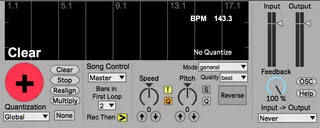
I'm proud to share a device I've been working on for quite a while now with you all. Timestretch Looper is an audio looper quite similar to the one you find built into Live. That's not a mistake, I like Live's Looper, but found it missing some functionality.
Timestretch Looper does "sound on sound" recording, but also incorporates:
- Timestretching. Independent speed, and pitch control, like Live's clips, but unlike Live's looper.
- "Multiply" functionality for destructively changing the lengths of clips.
- OSC input and output for controlling and monitoring any parameter of the device.
I have seen a lot of people trying to make loopers from scratch with MaxMSP and perhaps spending a lot of time having to reinvent the wheel, so I've done my best to make the code clean, well documented, and easy to modify. I hope this is a helpful starting point and perhaps a good example of clean Max programming practices.
I'm very interested in having you modify the code if you'd like, and perhaps contribute to working out a few of the persistent bugs that are noted in the Readme doc embedded within the device. I give complete permission to use this device, modify it, and even reupload modified versions. I've also created a github page for those that are interested https://github.com/jesseengel/TimestretchLooper.
Some Performance Notes:
-If the looper is in "Master" mode, and the transport is stopped, the "No Quantize" white text needs to be present to record your first loop, Otherwise it will wait to sync to transport that never starts. The device should set this condition on it's own, but every once in a while you might need to manually reset by pressing "Clear" once.
-Overdubbing on timestretch is unstable. I get around this by having the looper enter "Multiply" mode when timestretching is activated, which means that the second time you press the big button it sets a new length of the loop. This can actually lead to some very cool effects of mangling the orignal sound if you do it several times.
-Due to M4L's limitations on buttons, if you midimap to the big button, you can only have a single behavior. Within the "OSC" tab, however, there is a toggle to map a MIDI CC footswitch to that allows for Long Press "CLEAR" and Double Press "STOP", similar to Live's Looper.
Enjoy!
Update:
v1.1.0: Finally updated device to use groove~ object and not DiracLE~, so it now should work with 64-bit systems, work on both mac and windows, not require downloading from github, just download the device here.
Comments (26)
Have you tested it with Live 9?
Thanks for testing it. It looks like I originally made it in Live 8.2.2, so I'm guessing that the problem is with the 32 bit vs. 64 bit program.
Luckily, Timo also made a 64 bit version of DiracLE~ which I think I might not have been using, so I've switched them out and reuploaded the device. Please let me know if anyone can get it to work fine.
On my Mac Book Pro, it goes from 2 to 3% when loading the device and 7% when actually playing a loop (Dirac is pretty computationally expensive), so something in that range is what you should be expecting. The reason it's less while not playing is that I enclosed Dirac in a Poly~ so it could free up resources when not in use. I also included an extra bit of code to double make sure that that poly~ is only allocating one voice, otherwise that could take a lot of resources!
Hope that works, let me know, and happy looping!
I failed to realize I am on L9beta 64bit.
I will try to find 64bit DiracLE and report back.
Please head over to the github link
https://github.com/jesseengel/TimestretchLooper
and just press the "zip" button. That should download a zip file the unfrozen device and all the abstractions, poly patches, images, and externals needed.
Just put that folder somewhere in your MaxPath, and you should be good to go.
Someone please give it a try and let me know if that works for you. Also, if anyone has the frozen device here working, please let me know.
Thanks!
http://www.timorozendal.nl/?p=434
If someone gets this working okay, please let me know, and say which version of Live, Max, and OS you're using so I can try to trouble shoot.
Thanks so much,
Jesse
32bit OK.
32bit OK.
Same here. I'd appreciate any advice to improve the problem.
thanks
Only thing is, that it does start clicking quite a bit when you have several layers that go more into a drone kind of direction. Would it be possible to insert something like 1ms fade in/fade out?
Don´t know wether you´re still in for updating your device, but I wanted to give it a try. Don´t really know how to write M4L myself.
tim
- looper cant go play while global play has not been pushed
- looper cant go play via big button after it has been stopped
The only way to go play after looper has been stopped is to push realign.
But when realign was pushed and looper is playing sound - it is not in a play state, so we need to push big button just to enable play state, and push big button again for reording...
that's wierd... am i the inly user with that issue?
other functions are great!
it would be nice to have Undo button btw like in original looper
thnks)
Have you consider add an autofade out when the loop is stopped ? it 's nice for improvising.
It would turn 'great' to 'perfect'
Thanks