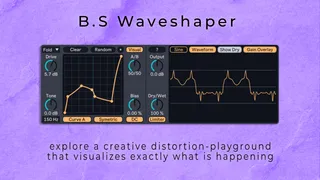
B.S Waveshaper - Creative Distortion Playground
B.S Waveshaper is not just another distortion plugin — it...
- Type
- Audio Effect
- Author
- bsaudiotools
- Version
- 1.0
- License
- Commercial
- Live version
- 12.0.5
- Max version
- 8.6.2
- Downloads
- 0
- Updated
- 2025-04-13
B.S Waveshaper - Creative Distortion Playground is an Audio Effect for Ableton Live by bsaudiotools, distributed as a commercial (paid) device. It targets Live 12.0.5 and Max 8.6.2. First published 2025-04-04, last updated 2025-04-13. 1 user comment below.
New to Max for Live? Read what Audio Effects do, what the Commercial license means, how to install a device.
Description
B.S Waveshaper is not just another distortion plugin — it's a creative distortion playground designed to push the boundaries of your sound. Built as a Max for Live device for Ableton Live, it fits seamlessly into your setup while offering a unique twist on traditional distortion. Whether you're looking to add subtle warmth or to add bold, characterful effects, B.S Waveshaper offers a unique combination of precision, creativity, and high-quality processing. With intuitive controls and extensive visual feedback, it lets you draw or randomly generate custom distortion curves to get your creativity going. Elevate your productions with a tool that combines artistic freedom with quality engineering.
Key Features:
-Customizable Distortion Curves: Draw your own curves or generate them randomly using a unique controlled randomization algorithm, surprising you with new, unique curves.
- Curve Crossfade: Seamlessly blend between two different distortion curves to add movement and depth to your sound.
- High-Quality Processing: Enjoy up to 32x oversampling for cleaner distortion with minimal aliasing.
- Symmetrical & Asymmetrical Distortion: Use symmetrical curves for classic distortion effects or switch to asymmetrical curves for a more edgy, harmonic-rich sound.
- Versatile Drive Modes: Choose between Clip, Fold, or Wrap modes to determine how the device handles signals that exceed normal levels.
- Extensive Visualization: Monitor real-time waveform and frequency spectrum displays, ensuring you always know exactly how your adjustments affect the sound.
- Additional Tools: Integrated Tilt EQ, DC Filter, and Safety Limiter provide extra layers of control and protection.
Support:
For any questions or support regarding the device, please email [email protected]. We also encourage you to read the manual before reaching out to ensure you get the most out of your plugin.
Happy Music Making!
Comments (1)