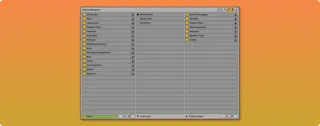
Device Navigator
Device Navigator allows you to navigate through the devices ...
- Type
- Audio Effect
- Author
- killihu
- Version
- 2.0
- License
- Commercial
- Live version
- 12.3.6
- Max version
- 9.0.10
- Downloads
- 0
- Updated
- 2026-04-17
Device Navigator is an Audio Effect for Ableton Live by killihu, distributed as a commercial (paid) device. It targets Live 12.3.6 and Max 9.0.10. First published 2025-05-30, last updated 2026-04-17. 3 user comments below.
New to Max for Live? Read what Audio Effects do, what the Commercial license means, how to install a device.
Description
Device Navigator allows you to navigate through the devices in a track. Clicking on the list selects the device and places focus on it, scrolling to make it visible if necessary. This makes it easier to navigate through tracks with a large number of devices.
In addition to navigation, it offers the ability to activate or deactivate each device from the list, individually or all at once. Each device has a Lock switch to exclude it from the global activation/deactivation. This makes it possible to activate or deactivate only the desired devices with a single action.
The devices displayed correspond to the selected track. The list changes automatically when changing tracks. However, it is also possible to display the devices of a specific track even when changing tracks in the project.
Multiple instances of Device Navigator can be used at the same time. By manually selecting different tracks in each instance, you can navigate through devices on different tracks. Clicking on the list selects the corresponding track and device, making the track visible and placing focus on the device.
Starting with version 2.0, it allows navigation within racks. Using the expand button at the top of the floating window displays two additional columns for navigating through the different chains of effects or instrument racks.
See details and changelog at:
https://killihu.vstskins.com/device-navigator/
Comments (3)
Would be interesting when recording for punch in fx.
Really liking your Alfil fast loader device btw.