ChromaPhase
Chromaphase is a Max for Live chorus device designed to insp...
- Type
- Audio Effect
- Author
- DysWaves
- Version
- 1.1.5
- License
- AttributionNonCommercialShareAlike
- Live version
- 11.3.0
- Max version
- 8.6.4
- Downloads
- 175
- Updated
- 2025-08-17
ChromaPhase is an Audio Effect for Ableton Live by DysWaves, distributed as Creative Commons Attribution-NonCommercial-ShareAlike. It targets Live 11.3.0 and Max 8.6.4. On maxforlive.com it has 175 downloads. First published 2025-06-02, last updated 2025-08-17. 2 user comments below.
New to Max for Live? Read what Audio Effects do, what the AttributionNonCommercialShareAlike license means, how to install a device.
Description
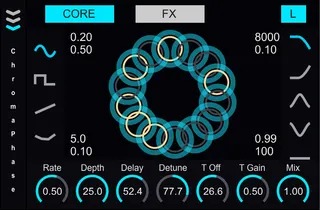
Chromaphase is a Max for Live chorus device designed to inspire creativity and breathe new life into your tracks. At its heart, Chromaphase combines a rich, multi-voice chorus engine with intuitive visual feedback, allowing you to sculpt thick, lush textures or subtle, moving atmospheres with ease. Whether you’re after classic, tape-style warble or experimental, glitchy detunes, Chromaphase’s flexible routing and modulation options give you full control over every nuance of your sound.
On the Core page, you’ll find straightforward controls for Rate, Depth, Delay, Detune, Tap Offset, Tap Gain, and Mix—everything you need to craft anything from a gentle doubling effect to soaring, cinematic sweeps. Flip over to the FX page to dial in creative elements like frequency shifting (with multiple voices), saturation, and final output gain. Edge-of-screen boxes let you reach in and tweak wow, flutter, filter cutoff/resonance, and feedback behavior. Each parameter reacts visually: turning up Saturation bathes your voice circles in warm yellow hues, raising Frequency Shift turns affected voices dark grey, and pumping Feedback wraps everything in a soft halo.
Visually, Chromaphase is a joy to interact with. Hovering over knobs and edge boxes zooms them larger for precise tweaking, while the central blue circle—surrounded by white “voice” rings—always reflects how many chorus layers are active and how they move together. Double-click any control to instantly snap back to its default. Beneath the hood, a built-in feedback limiter and saturation drive ensure your signal stays tight and musical, even when you push things to extremes.
Compatible with live 11.3.0 or later.
v1.1.5:
Fixed an issue with parameter mapping.
Added Expand button and expanded section for easier parameter mapping.
Updated user manual.
Comments (2)
Thank you for your comment! I’ve just uploaded version 1.1.1, which fixes the hover zoom instability on the knobs. I appreciate your feedback, glad you like the device!