Flanger
This Flanger is a very simple and basic effect, allowing eas...
- Type
- Audio Effect
- Author
- ksproduction
- Version
- 1.0
- License
- Commercial
- Live version
- 12.0.5
- Max version
- 8.6.2
- Downloads
- 0
- Updated
- 2025-06-12
Flanger is an Audio Effect for Ableton Live by ksproduction, distributed as a commercial (paid) device. It targets Live 12.0.5 and Max 8.6.2. Published 2025-06-12.
New to Max for Live? Read what Audio Effects do, what the Commercial license means, how to install a device.
Description
This Flanger is a very simple and basic effect, allowing easy use for beginners.
This audio effect is automation-friendly!
Sounds great!
AND is very CHEAP!!
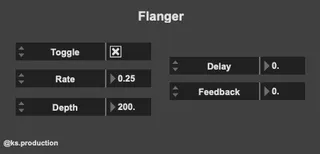
The controls consist of:
Toggle
Rate
Depth
Delay
Feedback
Toggle allows you to switch the effect on/off.
The rate allows you to control the speed of the delay time.
Depth allows you to control the intensity of the modulation, or the sweep of the LFO that modulates the delay time.
Delay allows you to create a 'comb filter' effect, only allowing certain frequencies to be enhanced, while the others are suppressed.
Feedback allows you to manipulate/manage the signal being sent back from the output to the input, where it is processed again.