a better search for max devices
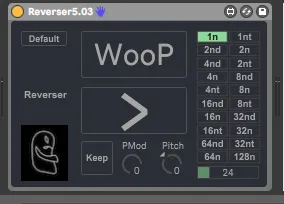
Reverser screenshot

Reverser

by jabbone

A beat repeat which reverses the slice. Feedback is a...

View on maxforlive.com

Type
Audio Effect
Author
jabbone
Version
5.03
License
AttributionNonCommercialShareAlike
Live version
10.30
Max version
8
Downloads
44,201
Updated
2021-04-10

Description

A beat repeat which reverses the slice.

Feedback is always welcomed, it takes a while, but hopefully it delivers some results. good glitchin everyone!

little update, GUI now compatible with L10&11

Added "Keep" button: keeps the sampled loop even if effect is un"Wooped". To resample new material "keep" must be off.

This is not a granular based device, so no warping, if you change tempo in Live and the effect is the pitch of the sample will change, as per a tape delay.

Comments (41)

  • jabbone · December 16 2009
    mmm works fine for me.
    maybe i should post some instructions:
    load the device. to make the effect effecting be sure that you click on the "woop" button.
    If you want to reverse it click on the "straight/reverse" button.
    If you want to scratch the audio material map a MIDI CC to the Director control, if you want to change the length of the audio buffer change the grid.
    If you have temporal problems try to press LB button again.
    It is indeed a really simple device.
    If you get clicks change the %value, which changes the smoothness.
    I used some basic MSP building blocks, which should be part of the "tools Section", such as the M4L balance and M4L gain, be sure that they are pointed out in the search path.
    hope this helps.
  • stanzarossa · January 01 2010
    it would be wonderfull if you put some quantization when pressing the woop button (pressing it buffering 1/8 and quantizing the buffer to the nearest 1/8)
  • jabbone · January 06 2010
    sorry for the late reply, will do asap, thanks for the suggestion.
    And a sonic blasting new year !!!
  • lockley333 · April 22 2010
    This is my favorite effect I've found on this site.
    Big ups to jabbone for uploading it! I like to use it
    on the master channel for a nice glitch effect.
  • mlanson · May 31 2010
    So far my favorite too. so simple yet so good sounding. I'll just record a bunch of variations and splice them all together overlaying the original.
  • jahdely · June 29 2010
    GREAT!
  • ebayo · July 19 2010
    Great app, well done !
  • mingus · July 27 2010
    I love it, had a thought I could map the quan to a slider to swith between the,, I see you had that thought before me - perfect! Auto for life! :)
  • pablobastet · October 24 2010
    Very good, I occupied it in my next set.
    +5
  • ruthlessproducer · October 25 2010
    Awesome mate, simple but VERY effective!
    world needs people like you :0)
  • jakedeniro · November 27 2010
    This is so beautiful and simple - inspiring! Thank you for your creation.
  • aukleive · January 08 2011
    Hi, and thanks for a neat device, already in serious use!!
    Would it be possible to make it respond correctly to other meters than 4/4? I frequently use 5 and 3, and the note-values are totally out of it then...
    best regards and thanks again
    Audun K.
  • aukleive · January 08 2011
    Maybe I should mention that I have placed it after Lives own looper-device...
    Audun
  • aukleive · February 22 2011
    Hi, to my mentioned problem with other meters than four:
    I found the solution: simply remove the last "1" from the "phasor~ @frequency 1 0 0 bars.beats.units @lock 1" so it reads "phasor~ @frequency 1 0 0 bars.beats.units @lock"...
    Now the repeat-buttons (and pitch) will correspond correctly to all meters or rather quarternotes...except the bottom one -reading one - it is still 4 beats....but who gives a shit ;-))
    Thanks..
    A
  • aukleive · February 22 2011
    Uupss...worked for a while, but suddenly started reacting weird to tempo- and meterchanges again...after completely removing "....@lock" also it worked somehow, but now....hmmm..
    I tried ;-))
    A
  • aukleive · February 22 2011
    Ok, I finally got it. To make this work in any metre:
    Replace the "phasor~ @frequency 1 0 0 bars.beats.units @lock 1" with "phasor~ 1n @lock 1"...
    Now it DOES work....
    happy bitpunching...
    A
  • jabbone · March 07 2012
    cool, as said this is a simple demonstrative device, there are many ways to do things in max hence m4l, nice to see that you found an improvement!!! p.s. I pass by here once every 2 centuries, sorry been very busy on another miliions of things. Working on new stuff, check if you want and contact me via pm
    http://www.youtube.com/watch?v=IkDfhcKuA9o&feature=related
  • ytsek · April 22 2012
    This device crashes Live when I change the sets tempo.
  • jabbone · April 24 2012
    Hi ytsek, would be nice to know which version of Live, Mac or Windows, etc. I hope I can help.
  • smilinggoat · July 01 2012
    Hi jabbone, this is an excellent little looper. Thank you for making it publicly available and editable! One issue though is that that if Live is synced to an external clock, the pitch gets changed either up or down at least a semi-tone even if the pitch knob is kept at +127. Curious symptom. Any suggestions how to work around this limitation?
    Cheers and thanks again,
    Richard
    Mac OS X 10.7.4
    Live 8.3.1
    Max Runtime 5.1.9
  • jabbone · July 04 2012
    thank you for trying it out ! hmmm, interesting, have you tried changing the arguments to phasor? try phasor~ 1n @lock 1 . The device gets its syncing/speed (and consequently pitch) from the phasor object which gets timing information from Live´s master timeline. being signal driven if the tempo of Live wobbles the device timeline will wobble too, consequently also the playback. The fact that you get a fixed semi tone up pitch is strange, I would have expected some pitch modulation (maybe even interesting ;-) ). I will try it out as soon as I can! thank you again, Jacopo.
  • zeep · September 18 2012
    This effect doesn't remember it's settings when saved in a set.
    When i open the project the Woop gui shows the exact settings i selected but the effect plays as if it's loaded with initial values.
    I.e. save a project with Woop in reverse mode. Save the project and load the project, now Woop plays forward even when the settings show reverse.
  • jabbone · September 23 2012
    this is true, in fact to work the effect needs to "sample" some audio first. You probably need to touch the effect once after start up, to reset it and make it sample again (if I understood correctly what actually is happening is that the effect is activated before sampling any incoming signal).
  • whiteboxsynthmakers · October 05 2012
    This is what Max is good at. Simple yet surprising. Thanks jabbone.
  • scabx345 · March 16 2013
    Hey Jabbone, great device, really should be come standard with live. I'm also experiencing tempo related crashes. If you'd like i can send you a bug report pack, just let me know where to send it.
    thanks!
    Live 8.3.1
    Max Runtime 5.1.9
  • jabbone · March 22 2013
    Hi there, thanks for the download, unfortunately I do not work for Ableton so I have not the possibility of analyzing bug reports as they can ( I believe most m4l users/developer cannot too). - bummer -
    The device is made 100% with max standard objects so it is difficult to understand if it is a problem of the device, max or whatever is going on in any particular set.
    It would be great though to at least give it a try. You can contact me via PM on this site or via the Ableton Forums, also under Jabbon.
    Thank you again J.
  • cashbrown · February 26 2015
    this is exactly what i've been looking for! been trying to buy a peavey or cycloops but this is much easier to integrate. thanks heaps and good work
  • Dildano · May 21 2015
    I've tried out all the reversers on this site and only the minipeater is actually synced on reverse, however it only allows 1/4 notes for longest possible length. Check your device by sampling a section running forward, then reverse. Sample the repeating forward loop into another track in Ableton. Now reverse that audio.
    Set your reverser to reverse
    Sample that
    Compare the files in arrangement view in 2 separate tracks. Notice your reversed sample is offset.
    I even added a quantization to switch to reverse only on a bang from the metro locked to tempo and 1/4 notes, still offset. It would be awesome to have a reverser that was in time... I don't know how you or no one else on here noticed that in reverse its offset. You added a bunch of featured but the core thing should be that it's synced / exactly the same as taking chunk of audio and reversing the clip. I'd love to see an update.
  • rico909 · September 13 2016
    this device is amazing!! only 1 PROBLEM, im using it for my live set, and sometimes im changing the BPM with my push 2, as i change the tempo of ableton, the reverse start to reverse the sound of the track channel im using, so i have to set everything to zero in order to stop it, anyone know how to stop this?
  • jabbone · September 27 2016
    hi rico, will look into this, altough I am not a Push user. 1) which OS ? 2) Push 2 ? 3) If I understood you correctly the device gets triggered even if off as soon as you modify the tempo via Control change from Push? Or it happens whenever you change tempo ?
    thanks J.
  • zloolz · October 17 2016
    As a previous poster I also have a save problem.
    If I save Reverser as a Live preset and load it after, it doesn't remember the settings. In fact, I can see my previous settings for two seconds, and then the device is restarted with the default settings.
    Am I the only one experiencing this ?
    Live 9.1.X
  • jabbone · January 17 2017
    hi guys, I checked it up, if I have time will give it a try and solve this. Due to m4l initialization I trigger a bang which loads the default settings exactly 2 sec after the device has been loaded.
    Obviously creating a Live preset won t work very well.
    It is an easy fix if one´s got time, which I lack at the mo. So if anyone wants to pinch in I am happy.
    ciao J.
  • jabbone · January 17 2017
    @rico909 no idea why, I could not reproduce. Be aware though that the buffer size is related to the BPM so you could have sound artifacts (like a tape recorder).
  • mlbstrd · May 12 2017
    Hey jabbone, I'm loving this device, but as a user above pointed out the device fires when tempo is changed, and the "woop" button needs to be switched on and off again to fix. This happens when manually moving the master tempo, with a midi controller mapped to tempo, or (crucially for me) when a scene is launched that has a tempo. I'm triggering using Launchpad, as soon as move to song 2 it's game over!
  • carballocba · April 29 2021
    grazie! very useful and fun
  • bnjmnshw · June 09 2022
    Love this thing, but doesn't seem to be working for me anymore? No change in sound whatever I click. Ableton 11.1.5.
  • jabbone · August 24 2022
    Hi, sorry for the delay.
    Issue #1 : the device samples incoming audio, and is tight synced to the master clock. If one changes the clock while the device is active the internal buffer gets reset.
    Possibly for a future update I will work on the feature you request
    Issue #2: regardin Live 11, I have not tried it with 11.1.5, did you make a fresh install of the device? could you please open the device in m4l editor and see if it gives you any errors? The device is assembled with only standard max objects and it should work with any m4l version, from 5 to 8 ...
  • stilleto · August 07 2024
    I love the device. It does its job very well. In fact, I couldn't find a free M4L device not even close as good as this one for live performance.
    However, I cant use it because it doesnt store the settings within the Live template. I use several copies set to different quantization, with trigger buttons mapped to a midi controller. Re-setting each one of them on every launch of a project is frustrating. A midi mappable quantization to midi buttons would solve all problems for live performance situations.
  • jabbone · September 23 2024
    hi, sorry for the late reply, what do you mean it does not store in the Live template? It should. Will check it out as soon as I have time. Which version of Live btw?
  • Asher · December 10 2024
    Thank you !!
  • tobia · February 16 2025
    One of my favorite M4L device! I set it on my master channel for live performance. I have recorded some macros into some snapshots and recall them with my Launchpad S in User Mode. The only bug I have is that the sound no longer passes through it when the tempo changes. Can someone help me with this?

← Back to search