- Type
- Audio Effect
- Author
- klirr2007
- Version
- 0.2
- License
- Attribution
- Live version
- 8.1
- Downloads
- 1,399
- Updated
- 2009-12-25
odrive is an Audio Effect for Ableton Live by klirr2007, distributed as Creative Commons Attribution. It targets Live 8.1. On maxforlive.com it has 1,399 downloads. First published 2009-12-20, last updated 2009-12-25. 2 user comments below.
New to Max for Live? Read what Audio Effects do, what the Attribution license means, how to install a device.
Description
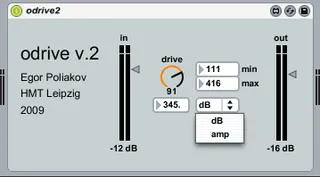
Simple overdrive Plugin based on "clip~"-object from max/msp. You can use dB or amp value to overdrive and set free the control limits of the drive dial (very useful for midi-controlling).
All plugin settings will be 100% saved with your project.
Comments (2)
Really usefull, give a warmer and juicer sound to anything, with just few parameters, from soft tube dynamic to extrem shred distortion. Love the in and out features,
thank you very much for that, in my top for sure :)
Default min and max values are 0 and 120. I'll focus on "max" value on this example.
So if i put lower then 120 something like "50" then i can obviously dial "drive" in larger amount (finer) which is great.
But if i save project and reopen it "drive" is saved and value is displayed correctly as "50" but sound is heavily distorted. Very overdriven.
I discovered that previously dialed "max" value of 50 is in fact back at "120" even if value is displaying "50".
So in fact only safe using of this plugin is to not to mess with "min" and "max" default values so drive range is not broken after reopening.
If you have any questions i can post you examples. Should i send you email or something?
Thanks again and don't get me wrong i reaaaallly like this device.