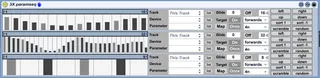
3X Parameter Sequencer
This patch is hacked together from the LineFO, ML-185, BeatG...
- Type
- Audio Effect
- Author
- lvehon
- Version
- 1.0.2
- License
- None
- Live version
- 8.1
- Max version
- 5.1.9
- Downloads
- 23,749
- Updated
- 2012-10-22
3X Parameter Sequencer is an Audio Effect for Ableton Live by lvehon, distributed as freeware, with no license specified by the author. It targets Live 8.1 and Max 5.1.9. On maxforlive.com it has 23,749 downloads. First published 2009-12-16, last updated 2012-10-22. 23 user comments below.
New to Max for Live? Read what Audio Effects do, how device licenses work, how to install a device.
Description
This patch is hacked together from the LineFO, ML-185, BeatGenSeqMod and Simple Sequencer. Thanks to 3st, synnack, pp, native mfl devices, and Darwin Grosse.
This device is an FX sequencer that makes use of Lives API. It will control Lives internal devices or external plug-ins.
Check out the External Midi Control device to mess up your hardware sythnz... or anything else.
Update
Adds loop length control and transform buttons
More step intervals to choose from
Interface should be easier to see with some skins
Update
Glide
Update
Adds AuralBees suggestion
Update
Put the parameter selection boxes from the live lfo devices in. Thanks Ableton/Cycling 74.
Comments (23)
This is very cool!
Maybe you could replace the step part with an" envelope"
really usefull.
but no way to record the changes in clips or arrangement (i guess it's because you don't use enveloppe).
name of the device don't change if you change the device, but still work with the old name (device & parameters)
@lek
Could you explain the problem your having a little more.
any thoughts?
I've noticed this too, even after hitting the get devices button. Re-selecting the effect should make the parameters pop up again.
Not sure about how to fix this.
it makes my instruments/devices come alive!
just what i needed.
all the best,
Wasili
I just discovered how to recall assigned effectparameters, so this gets stored in a Live project!:
Create a pattr-object, in inspector tick the 'parameter enable'
box. Now connect the middle output of pattr to the right input
of each M4L.api.DeviceParameterRemote. This works for me now, and highly improves usability.
In my excitement I maybe was not clear enough:
You have to create a separate pattr object for each M4L.api.DeviceParameterRemote :-)
Well here it is: http://www.pyrolator.com/downloads/soundwave_ext_contr.amxd.zip
If you put this object in front of the 3X Parameter Sequencer, you also can assign the 3 sequences to the "soundwave-ext-contr"-plugin and send from there Midi-Controller-Data. You just have to open another Midi-channel within Ableton Live and make this the Midi-input and choose as Midi-Output any Interface which is connected.
sometimes the assignments dont start modulating again once play back has stopped and started again, or if copied and pasted, so to cure this i have to go into it again and reassign them to make it work again.
sorry if this has been mentioned already.
great stuff cheers.
sometimes the assignments dont start modulating again once play back has stopped and started again, or if copied and pasted, so to cure this i have to go into it again and reassign them to make it work again.
sorry if this has been mentioned already.
great stuff cheers.
i experienced the same glitches as everyone has mentioned above, but they are not bad enough to make it unusable - nothing that can't be resolved by just restarting the program. it does a weird thing where if you group your whole track into a rack (to use it in another session), it forgets all the parameter assignments and only shows macros - this seems to happen with all max for live parameter modulation tools, not sure why....also if you change an assignment sometimes it will still modulate the last parameter - i'm sure you know all this. anyway, great work and i can't wait for the update.
I've been using this device on all my tracks now, totally love it, but (as you might be aware) the latest 8.2.2 Live update broke it. Any chance on making an updated version? That would be great!!
Thanks!