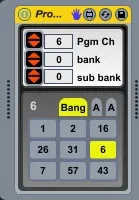
Program Change and Auto1
Hello, My new program change.. Is an program change c...
- Type
- MIDI Effect
- Author
- dric
- License
- Attribution
- Live version
- 8.3
- Max version
- 6
- Downloads
- 1,444
- Updated
- 2012-11-01
Program Change and Auto1 is a MIDI Effect for Ableton Live by dric, distributed as Creative Commons Attribution. It targets Live 8.3 and Max 6. On maxforlive.com it has 1,444 downloads. First published 2012-10-31, last updated 2012-11-01.
New to Max for Live? Read what MIDI Effects do, what the Attribution license means, how to install a device.
Description
Hello,
My new program change.. Is an program change classic with 9 buttons.. each is assignable to an "pgm"
For assign an pgm to the 9 buttons, click to middle tab named "assign" and define a pgm number for each buttons.
You can automate your "pgm change"
The position of automation is syncronised with the global transport.. You can record max 32 bars..
For recording push to the right tab, and
1: push auto "on"
2: push record/play button..
3: push the 9 assignable buttons or move the pgm numbox ..
4: When is done, stop recording and is finish... is automated..
The little red button in automation tab is for deleting automation.. the blue for open tab and you can see and draw..
You can automatize Pgm 1 to 128
you can also recording a classic automation in track or clip enveloppe.
I create this for the groove box of reactor.. but you can use with any device midi, external synth or sampler ect..
Sorry for my english