- Type
- MIDI Effect
- Author
- chapelierfou
- Version
- 1.00
- License
- AttributionShareAlike
- Live version
- 12.0.5
- Max version
- 8.6.2
- Downloads
- 217
- Updated
- 2025-09-09
Ramper is a MIDI Effect for Ableton Live by chapelierfou, distributed as Creative Commons Attribution-ShareAlike. It targets Live 12.0.5 and Max 8.6.2. On maxforlive.com it has 217 downloads. Published 2025-09-09.
New to Max for Live? Read what MIDI Effects do, what the AttributionShareAlike license means, how to install a device.
Description
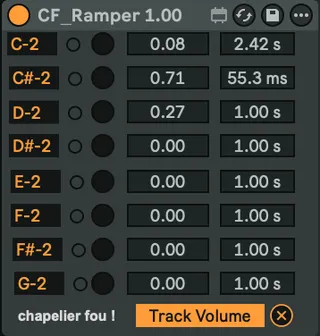
Select a parameter to control, then trigger 8 different ramps with their own time and target value with 8 MIDI notes.
Useful for fade in, fade out, etc.
HOW TO USE :
- map to a parameter (like volume of a track)
- change this parameter to the target value
- click on the little round button to get the target value
- repeat on other lanes
- use midi notes to trigger these ramps.